School districts comparing cloud phone systems and legacy PBX systems are usually not asking a simple technology question. They are trying to decide whether the current phone environment can still support front offices, classrooms, district administration, transportation, maintenance, E911 planning, number routing, and phased migration without creating unnecessary risk or cost.
A legacy PBX may still place calls, but that does not mean it is easy to support, easy to change, or ready for modern emergency calling requirements. A cloud phone system may reduce hardware burden and improve administration, but it still requires careful planning around network readiness, E911 location data, call routing, porting, user access, and support.
The right question is not, “Is cloud better than PBX?” The better question is, “Which phone system model gives the district the best combination of reliability, control, cost visibility, emergency calling readiness, and manageable migration?”
Request System Review | Download the District Phone System Modernization Roadmap
What a legacy PBX is
A PBX, or private branch exchange, is the phone system that manages internal extensions, outside calls, transfers, voicemail, call routing, and main number handling. In many school districts, the PBX is a physical system located in a district office, main campus equipment room, or network closet.
A legacy PBX often depends on on-site hardware, cards, gateways, phone cabling, analog lines, PRI circuits, SIP trunks, or vendor-specific handsets. Some systems have served districts for years. That long service life can be a strength, but it can become a problem when parts are difficult to find, technician knowledge is retiring, system documentation is incomplete, or the district needs features the old system was never designed to support.
Legacy PBX replacement is rarely just about removing a box from a closet. It involves main numbers, direct numbers, emergency calling, call trees, classroom phones, office routing, specialty lines, and staff habits that may have built up over many years.
For a broader replacement guide, see PBX Replacement for Schools.
What a cloud phone system is
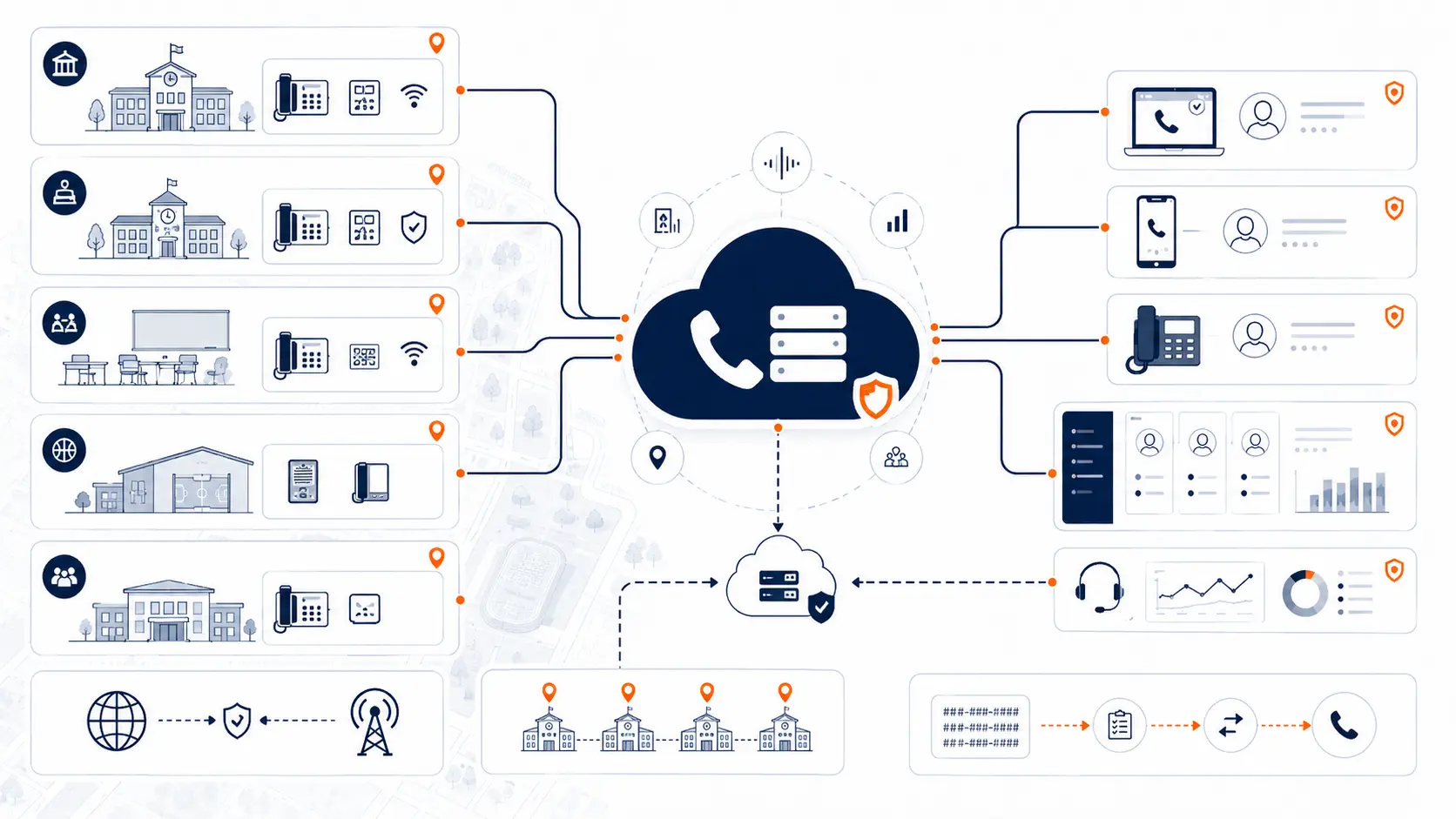
A cloud phone system is a hosted phone platform where the core phone system runs in a provider-managed environment instead of on district-owned PBX hardware. Schools may still use desk phones, but the call control, routing, voicemail, user settings, and administration live in a hosted platform.
For districts, cloud phone systems can support:
- Desk phones in front offices, classrooms, and departments
- Softphones for laptops or desktops
- Mobile apps for approved staff roles
- Centralized administration
- Auto attendants and ring groups
- Voicemail and call routing
- Number porting from existing carriers
- Multi-campus routing design
- E911 planning and location records
Cloud does not remove the need for planning. A school district still needs internet reliability, network readiness, correct phone placement, accurate E911 location data, number porting coordination, and a practical support model.
For a deeper cloud-focused page, see Cloud Phone Systems for Schools.
Cloud phone systems vs legacy PBX: the district comparison
| Area | Legacy PBX | Cloud phone system |
|---|---|---|
| Core system | Runs on district-owned or site-based hardware | Runs on hosted infrastructure managed by the provider |
| Hardware burden | Often depends on aging PBX equipment, cards, gateways, and local support | Reduces PBX hardware burden, but still requires phones, network, and internet planning |
| Administration | May require specialized knowledge or vendor support | Usually managed through an admin portal |
| Scaling | Can be limited by hardware, licensing, wiring, or system capacity | Easier to add users, devices, and routing, but pricing model matters |
| E911 planning | May have stale location data or older dialing behavior | Can support modern location planning, but only if configured and maintained correctly |
| Remote access | Often limited or difficult | Can support softphones and mobile apps with proper policies |
| Multi-campus routing | May vary by campus or depend on older call flows | Can centralize routing, but design must reflect district operations |
| Number management | May depend on carrier records and old documentation | Can improve visibility, but porting must be planned carefully |
| Support | May depend on hard-to-find technicians or aging vendor knowledge | Provider support is central, but district support expectations must be clear |
| Cost visibility | Maintenance, carrier bills, and licensing may be scattered | Subscription costs can be clearer, but per-extension pricing can still be expensive |
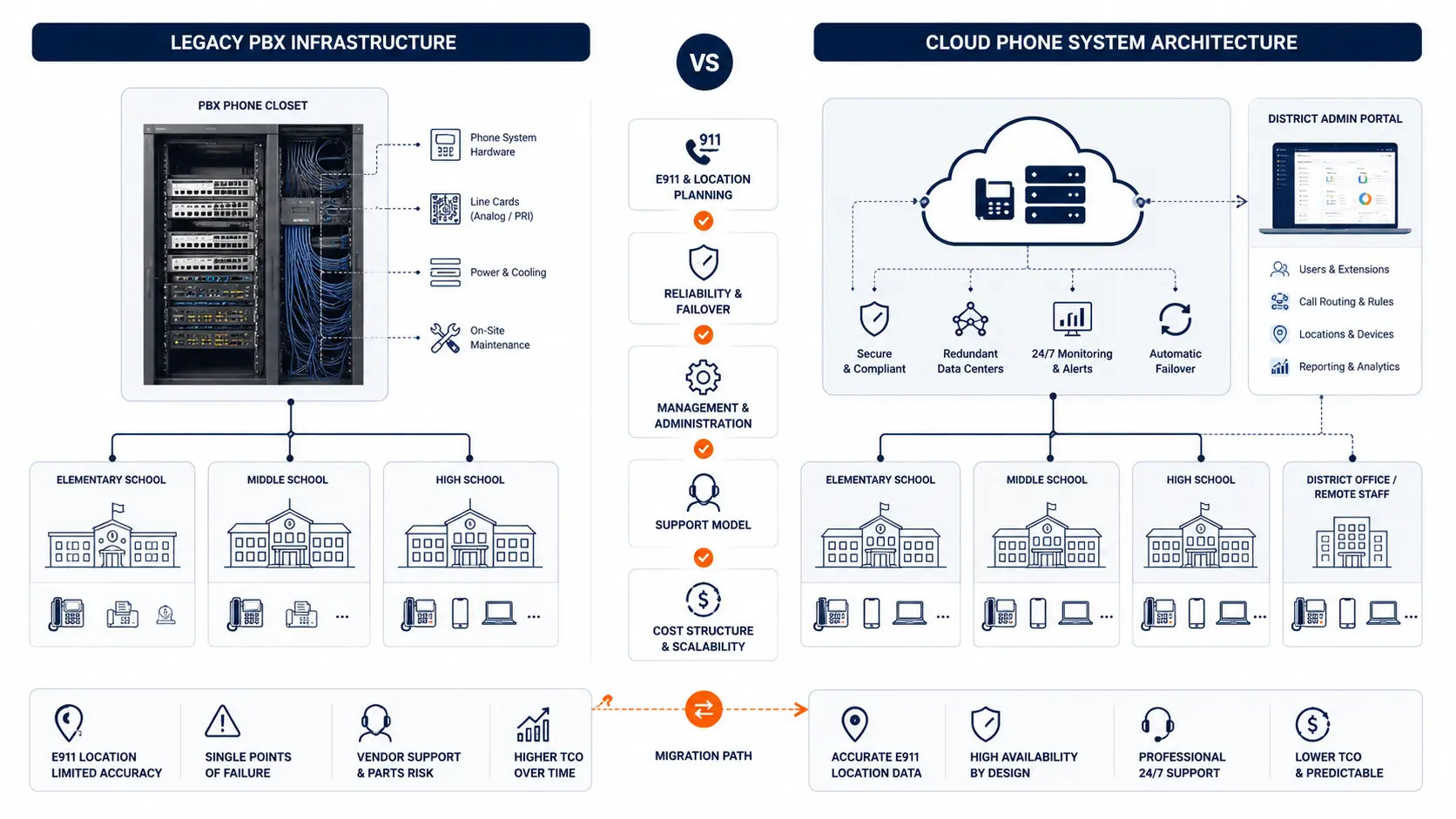
The table shows why this is not a one-sided decision. A cloud phone system can be the better long-term model, but only when the proposal fits the district’s buildings, users, call flow, E911 needs, and budget structure.
When a legacy PBX may still look acceptable
Some districts delay replacement because the PBX still works most days. Calls connect. Phones ring. The front office knows the old transfer paths. Staff have learned how to work around limitations.
That can make replacement feel less urgent than other IT projects.
The risk is that the district may be relying on a system that is becoming harder to support. Warning signs include:
- Only one person understands the system
- Parts are difficult to source
- Vendor support is limited
- Phone changes require outside help
- Call routing is poorly documented
- E911 location records are incomplete
- Analog lines are still scattered across campuses
- The district cannot easily support mobile or remote staff
- Outages take too long to diagnose
- Phone bills are difficult to explain
A working PBX is not always a healthy PBX. It may be stable enough for normal days but fragile when the district needs changes, recovery, expansion, or emergency calling accuracy.
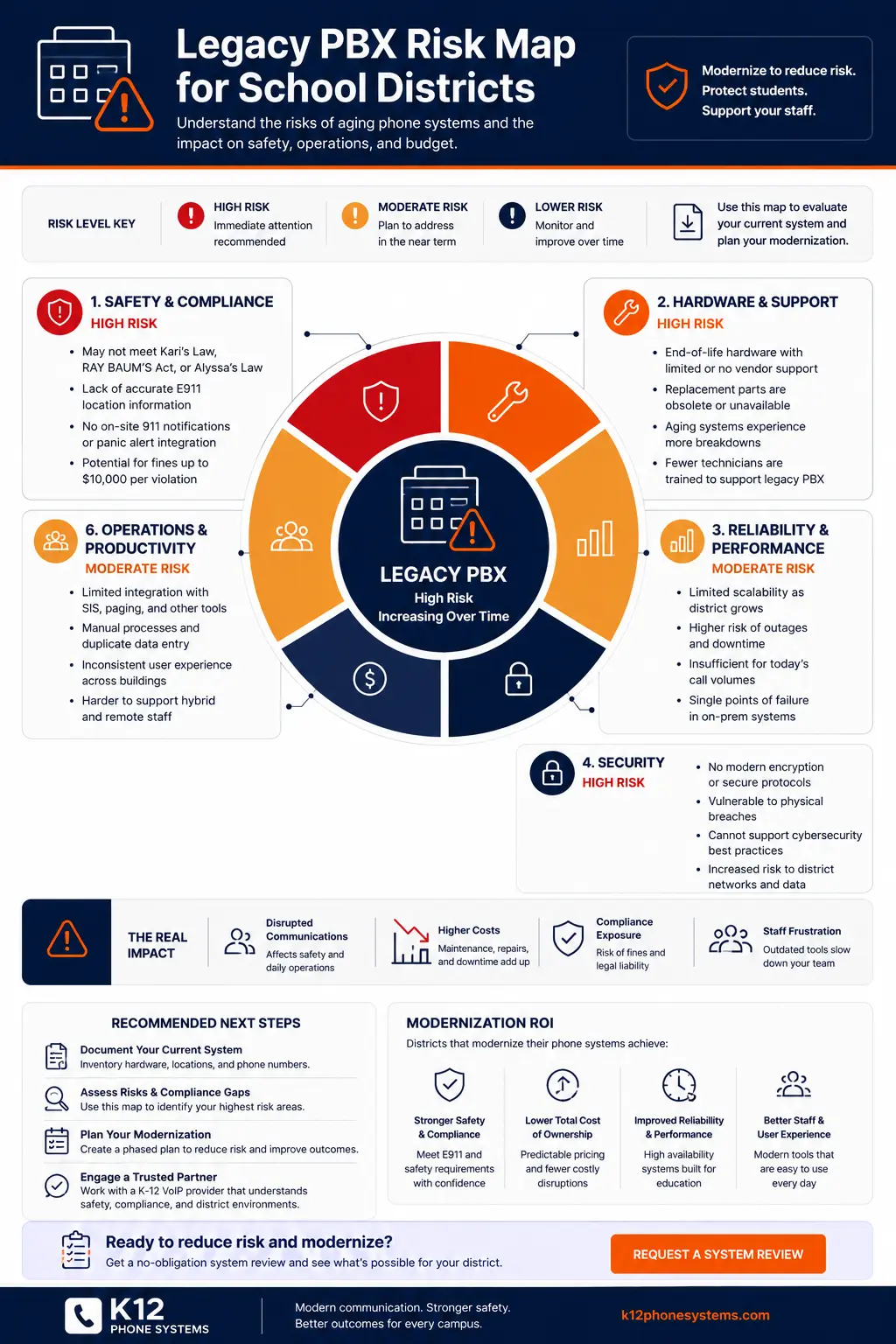
Use the Legacy PBX Risk Map for School Districts to review where the current environment may be creating risk.
When an existing VoIP system should still be questioned
Cloud and VoIP systems can age poorly too. A district may have already moved away from a traditional PBX but still be stuck with a system that costs too much, routes calls poorly, or was never designed around school operations.
This is common when a district is paying by extension.
Schools often have many phones and extensions that do not behave like business users. A classroom phone, cafeteria phone, maintenance phone, gym phone, or shared office phone may not need the same pricing model as a full-time administrative user. If every extension is billed like a full user, the district may be paying too much for the way schools actually communicate.
A district should question an existing VoIP installation when:
- Every extension is billed at the same rate
- Classroom or shared-area phones are priced like full users
- Unused extensions remain active after staff changes
- Support, taxes, recovery fees, device rentals, or add-ons keep increasing
- The system was sold as cloud, but daily changes still require vendor tickets
- Call routing does not match front-office workflows
- E911 location data has not been reviewed since deployment
- Softphones and mobile apps were added without location planning
- The district cannot clearly explain what each monthly charge covers
- Renewal terms make it difficult to adjust users or devices
The comparison should not be “old PBX bad, hosted VoIP good.” A bad hosted contract can create its own problems. The review should include the current pricing model, extension count, real usage, device roles, support terms, and routing design.
For a deeper cost discussion, read Why Per-Extension VoIP Pricing Can Cost School Districts Too Much.
E911 planning is a deciding factor
Emergency calling readiness should be reviewed before any phone system change. Kari’s Law and RAY BAUM’S Act created federal requirements around direct 911 dialing, on-site notification, and dispatchable location for multi-line telephone systems. The FCC maintains guidance on MLTS 911 requirements, and 911.gov provides public information on Kari’s Law and RAY BAUM’S Act.
For schools, E911 planning includes:
- Direct 911 dialing without a prefix
- On-site notification to designated staff
- Dispatchable location for buildings, floors, rooms, or areas
- Location records for fixed phones
- Policies for softphones and mobile apps
- Testing with appropriate coordination
- Ongoing updates when phones move
A legacy PBX may have old routing behavior, stale records, or limited location flexibility. A cloud phone system may support better administration, but it still must be configured correctly. Moving to cloud does not automatically solve E911.
Use the K-12 E911 Readiness Checklist and review E911 Compliance for Schools before deciding how to replace the system.
Cost is more than the monthly quote
A cloud phone system may look less expensive than replacing PBX hardware, but districts should compare the full cost picture.
Legacy PBX costs may include:
- Maintenance contracts
- Carrier services
- Analog lines
- PRI or SIP trunk charges
- Replacement parts
- Emergency repair labor
- Vendor programming fees
- Unsupported equipment risk
- Staff time spent managing workarounds
Cloud phone system costs may include:
- Monthly service charges
- Per-extension or per-user pricing
- Desk phone purchases or rentals
- Porting fees
- Support fees
- Add-on features
- Taxes and recovery fees
- Contract minimums
- Renewal increases
- Professional services for migration
A lower monthly quote is not always the better deal. A district should understand whether the pricing model matches actual use. If the district has hundreds of low-use extensions, per-extension pricing may create waste. If the district has many campuses and complex routing, an under-scoped quote may create problems during deployment.
The District Phone System Review Checklist can help organize what should be reviewed before comparing proposals.
Migration planning separates good projects from bad projects
A cloud phone system can fail in practice if the migration is rushed or underplanned. The most important parts of a school phone system are often the least visible:
- Main number routing
- Front office call paths
- Ring groups
- Auto attendants
- Department routing
- Classroom phone locations
- E911 records
- Bell, paging, fax, alarm, elevator, gate, or specialty lines
- Number porting sequence
- Staff communication before cutover
- Testing before go-live
A district should not treat migration as a single cutover date. A safer plan often uses phases by campus, department, or building group. That gives the district time to test call flow, confirm E911 routing, train staff, and correct issues before the next phase.
Use the District Phone System Modernization Roadmap to think through review, design, deployment, porting, and support.
Network readiness matters more with cloud
A legacy PBX may have worked even when the district network was not ideal. A cloud phone system depends more directly on internet access, LAN performance, switching, cabling, power, and network design.
Districts should review:
- Internet reliability at each campus
- Firewall and routing policies
- Switch capacity
- Power over Ethernet availability
- Battery backup for critical network equipment
- Cabling conditions
- Voice traffic handling
- Wi-Fi limitations for voice devices
- Failover options
- Help desk support during go-live
This does not mean cloud phone systems are fragile. It means the phone system must be treated as part of communications infrastructure, not just an application.
CISA’s K-12 cybersecurity guidance is a reminder that school technology infrastructure needs practical risk management, clear ownership, and ongoing attention. Voice systems should be reviewed as part of that broader operational environment.
Multi-campus districts need routing discipline
Multi-campus districts often have complicated call flow. One district may have elementary schools, middle schools, high schools, administrative buildings, transportation offices, maintenance facilities, and shared departments.
A cloud system can make routing easier to manage, but only if the district documents what should happen.
Questions to answer include:
- Which numbers belong to each campus?
- Where should after-hours calls go?
- Which departments need shared ring groups?
- How should calls overflow during busy periods?
- Who answers transportation calls?
- How should district administration transfer calls to campuses?
- What happens if one campus loses internet?
- Which staff need mobile or softphone access?
- Which phones require accurate fixed location records?
For larger districts, see Multi-Campus Phone Systems.
Questions to ask before choosing cloud or staying with PBX
Before choosing between cloud phone systems and legacy PBX, district leaders should ask:
- What problem are we trying to solve?
- Is the current PBX still supportable?
- Are we keeping the PBX only because replacement feels difficult?
- Are we already on VoIP but paying too much per extension?
- Do we know how many extensions are active and needed?
- Are E911 records accurate by building, floor, room, or area?
- Can we phase deployment by campus?
- Do we know which analog lines still exist?
- Can we keep existing phone numbers?
- Does the proposal include number porting and testing?
- Does the system support the front office call flow?
- Are softphones and mobile apps included or extra?
- What support is available during cutover?
- What happens after go-live?
These questions help the district avoid choosing based only on features or monthly price.
When a system review makes sense
A system review makes sense when the district is not sure whether to keep the PBX, replace it, renew a hosted VoIP contract, or ask vendors for proposals.
K12 Phone Systems can review:
- Existing PBX or hosted VoIP setup
- Phone bills and contract terms
- Extension counts and usage assumptions
- Campus and building layout
- Main numbers and call routing
- Auto attendants and ring groups
- E911 planning needs
- Analog lines and specialty services
- Number porting considerations
- Cutover and support risk
The goal is not to force a specific platform. The goal is to identify what the district has now, what is creating risk or cost, and what needs to be planned before replacement or renewal.
Related planning resources
- District Phone System Modernization Roadmap
- District Phone System Review Checklist
- Legacy PBX Risk Map for School Districts
- K-12 E911 Readiness Checklist
- School Phone Systems
Frequently asked questions
Is a cloud phone system better than a legacy PBX for schools?
A cloud phone system can reduce hardware burden and improve administration, but it is not automatically better in every situation. The district should review E911 planning, network readiness, routing, number porting, support, pricing, and migration scope before deciding.
When should a school district replace a legacy PBX?
Replacement should be reviewed when the PBX is difficult to support, parts are hard to find, phone changes require specialized help, E911 records are unclear, outages are increasing, or the district needs features the old system cannot support well.
Can a district already using VoIP still be paying too much?
Yes. A district may be using VoIP and still paying too much if every extension is billed like a full user, unused extensions remain active, fees keep increasing, or the contract does not match how school phones are actually used.
Does cloud solve E911 for schools?
No. Cloud systems can support E911 planning, but the district still needs accurate location records, direct 911 dialing, on-site notification, dispatchable location planning, testing, and ongoing maintenance.
Can a cloud phone migration be phased by campus?
Yes. Many districts benefit from phased deployment by campus, department, or building group. Phasing can reduce disruption and give the district time to test routing, E911, and staff readiness.
What happens to analog lines during a cloud phone migration?
Analog lines should be inventoried separately. Some may support fax, alarms, elevators, gates, or specialty devices. They should not be assumed to migrate the same way as standard voice lines.
What should a district review before comparing quotes?
The district should review phone bills, contract terms, extension counts, campus lists, call routing, main numbers, E911 records, analog lines, network readiness, and support needs.
Can K12 Phone Systems review an existing hosted VoIP contract?
Yes. K12 Phone Systems can review an existing hosted VoIP setup, extension count, pricing model, routing design, E911 planning, and renewal concerns.
References
- FCC Multi-line Telephone Systems 911 Requirements
- Kari’s Law and RAY BAUM’S Act on 911.gov
- E-Rate Schools and Libraries Program from the FCC
- CISA Cybersecurity for K-12 Education
Ready to compare your current phone system options?
Share your current phone setup, phone bill, hosted VoIP contract, campus list, or vendor proposal. We will help identify risk areas, cost concerns, migration considerations, and practical next steps.