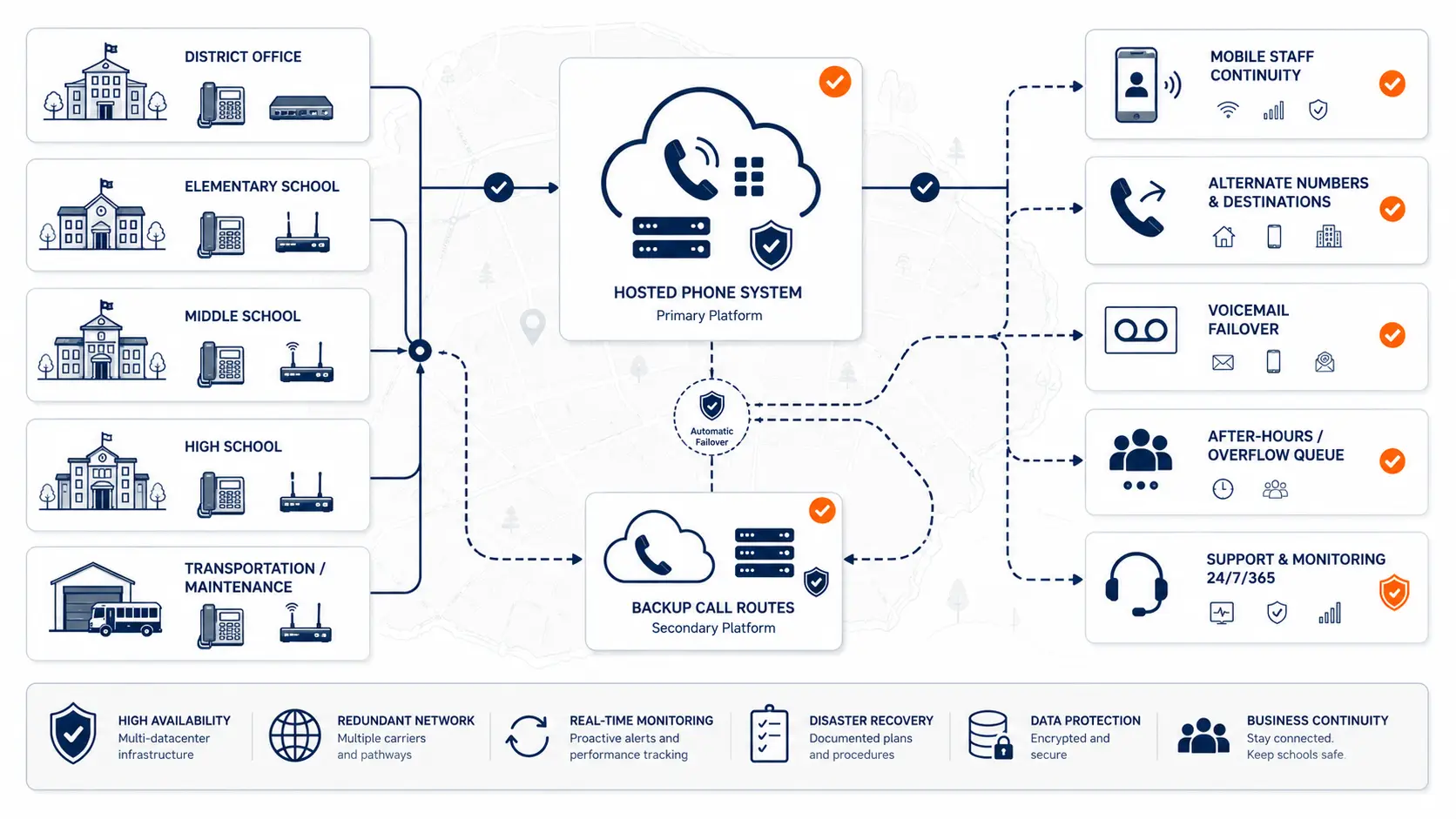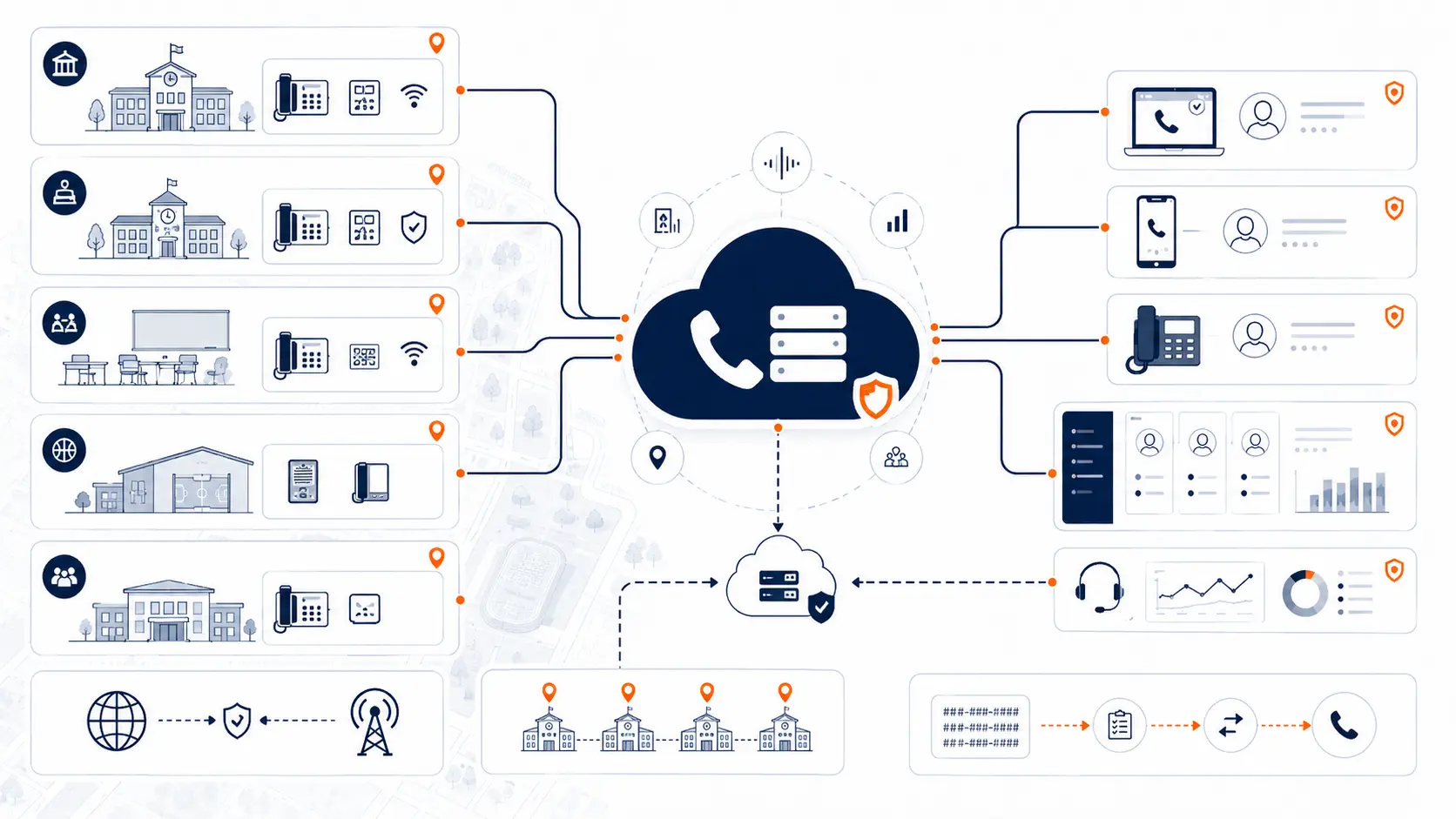
A cloud phone system for schools can be a strong replacement path for aging PBX equipment, expensive hosted VoIP contracts, and difficult multi-campus call routing. The decision is not just about moving phone service off-site. For a district, cloud calling affects front office workflows, E911 planning, number porting, extension design, building-level routing, mobile access, network readiness, cutover timing, and long-term support.
Request System Review | Download the District Phone System Modernization Roadmap
What a cloud phone system means for schools
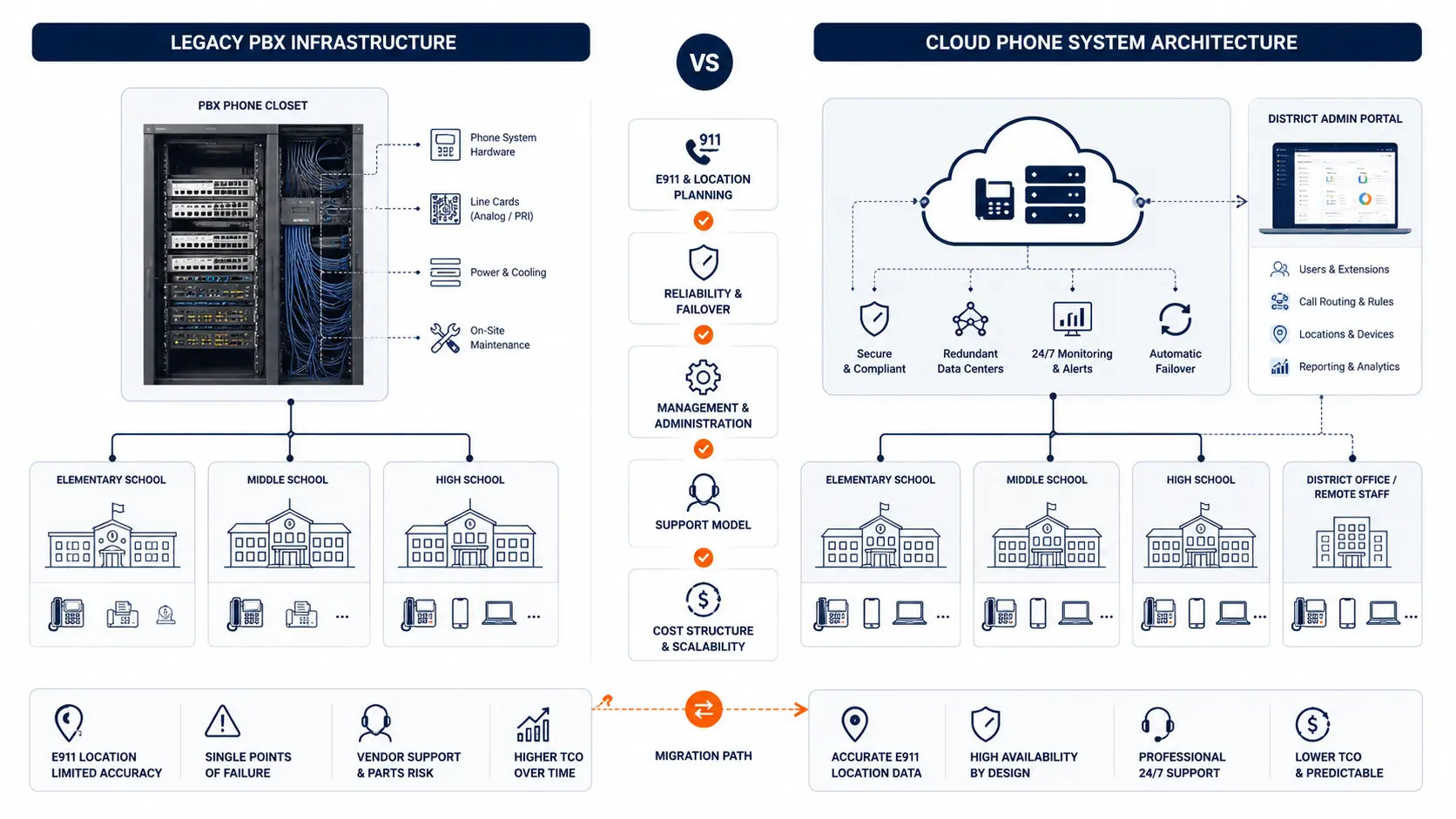
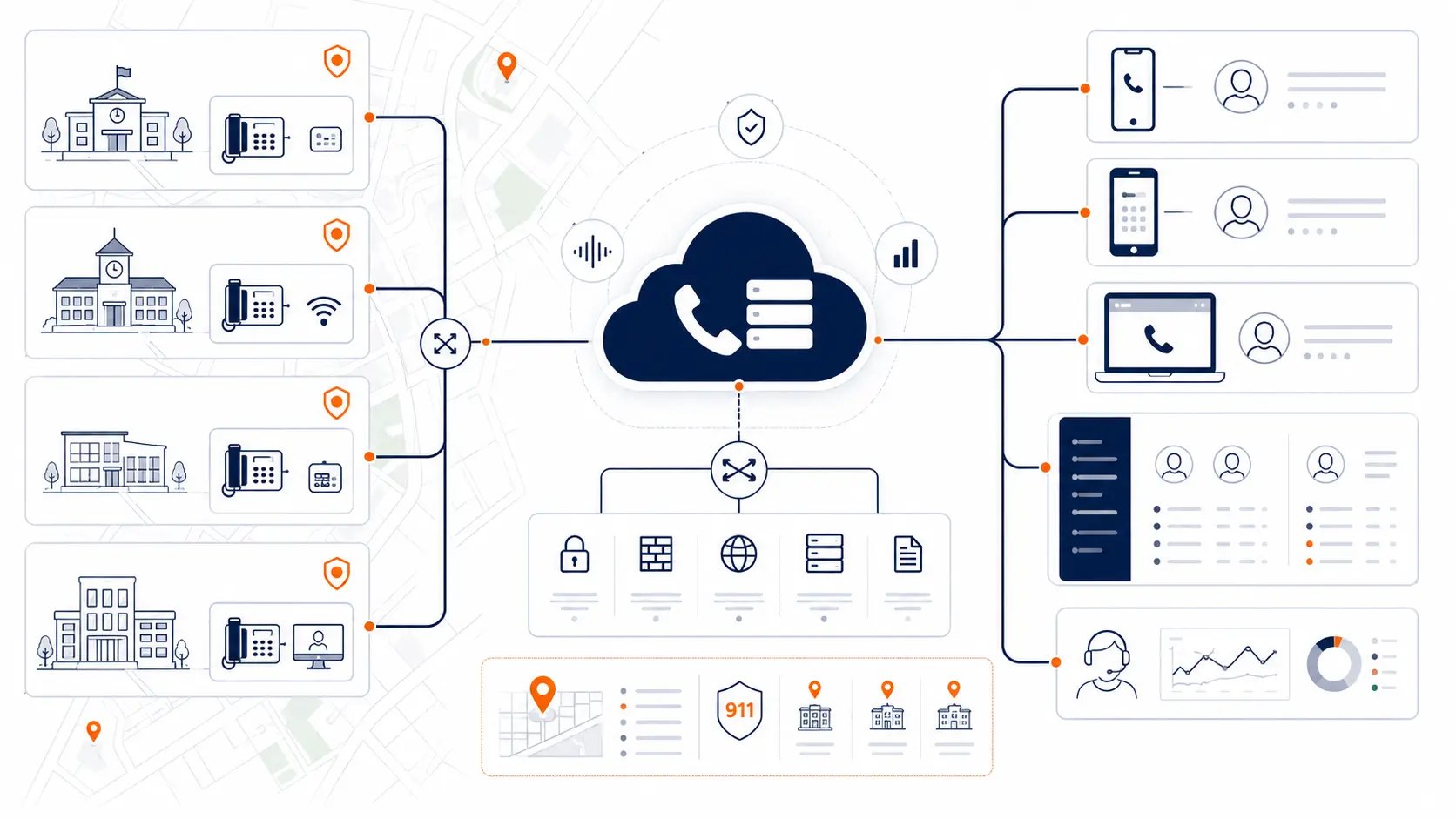
A cloud phone system is a hosted phone platform that runs in provider-managed infrastructure instead of a PBX cabinet sitting in a school building or district office. Staff still use desk phones, softphones, mobile apps, voicemail, auto attendants, ring groups, and main district numbers. The difference is that the call control platform is managed outside the district's buildings.
For schools, this can reduce dependence on aging hardware and local PBX maintenance. It can also make multi-campus administration easier, since extensions, routing, voicemail, and user changes can be managed from a central portal.
A cloud phone system is still infrastructure. It needs planning around buildings, users, emergency calling, network reliability, number records, call routing, and support. A poorly planned cloud migration can create many of the same problems as a poorly maintained PBX.
The right question is not, "Should schools use cloud phones?" The better question is:
Can the cloud phone system support the district's real operating environment, emergency calling needs, pricing expectations, and migration constraints?
Why school districts consider cloud phone systems
Districts usually consider cloud phone systems when the current phone environment is too fragile, too costly, or too difficult to manage. That may involve an old PBX, a hosted VoIP contract that no longer fits, or a mix of carrier services that no one fully understands.
Common reasons include:
- Aging PBX equipment
- Limited vendor support
- Hard-to-source parts
- Analog line replacement
- Rising maintenance charges
- High hosted VoIP extension pricing
- Inconsistent campus call routing
- E911 location planning needs
- Remote staff and mobile access
- Better visibility for district IT
- A need to phase deployment by campus
Cloud systems can help with central management and replacement planning, but they do not remove the need for careful design.
| District trigger | What it may indicate | Planning question |
|---|---|---|
| Aging PBX hardware | The district depends on equipment that may be difficult to repair | Which buildings and numbers depend on the old system? |
| Expensive hosted VoIP contract | The district may be paying too much per extension or user | Are all billed users active, needed, and priced correctly? |
| Analog line dependence | Specialty lines may be mixed into the phone environment | Which lines are voice, fax, elevator, alarm, gate, or specialty services? |
| E911 uncertainty | Location records may not match real rooms or devices | Who owns location data and how is it maintained? |
| Multi-campus routing issues | Call flows may have grown without a clean design | Should routing be rebuilt before migration? |
| Staff mobility needs | Personal cell use may be filling a system gap | Which users need softphones or mobile apps? |
| Poor bill visibility | Current costs may be spread across vendors | What is the total monthly cost of the current setup? |
Cloud phone systems vs hosted VoIP vs PBX
The terms can be confusing. In everyday buying conversations, "cloud phone system" and "hosted VoIP" are often used to mean similar things. A provider hosts the phone platform and the district connects phones and users over the internet or district network.
A PBX is the system that controls extensions, routing, voicemail, and calling. In older deployments, the PBX is on-site hardware. In cloud deployments, the PBX function runs in hosted infrastructure.
| Term | Plain meaning | School district planning concern |
|---|---|---|
| Legacy PBX | Older on-site phone system hardware | Support, parts, E911, analog services, and cutover planning |
| Hosted PBX | PBX function hosted by a provider | Pricing model, support, routing, E911, and contract terms |
| Cloud phone system | Hosted calling platform managed off-site | Network readiness, location data, devices, and migration sequence |
| VoIP | Voice calls carried over IP networks | Quality, internet reliability, LAN design, and failover |
| SIP trunking | Carrier service that connects calling to a PBX | Carrier records, number porting, billing, and support boundaries |
A school district can have a modern hosted system that is still a poor fit. It may be too expensive, poorly routed, difficult to administer, or tied to a contract that charges by extension instead of actual calling capacity.
When an existing VoIP system should still be reviewed
Not every replacement project starts with an old PBX. Many districts already use a hosted VoIP PBX, but the installation may still deserve review.
A current VoIP system may be worth questioning when:
- The district pays per extension or per named user
- The bill includes inactive users or unused seats
- Each added phone creates another monthly charge
- Support is only included at a limited tier
- Desk phones are leased or rented at inflated rates
- E911 location records are unclear
- Call routing is hard to change
- The district cannot easily tell what numbers are ported, hosted, forwarded, or still with a carrier
- The vendor charges add-ons for features the district expected to be included
- The system was copied from a generic business setup, not designed around schools
Per-extension pricing is a major issue. Districts often have many phones and extensions that do not all place calls at the same time. A campus may need phones in offices, classrooms, workrooms, libraries, gyms, cafeterias, maintenance buildings, and transportation areas. Charging full monthly fees for every extension can produce a bill that feels more like a user tax than a communications plan.
A better review asks how the district actually uses phones:
- How many calls happen at the same time?
- Which phones need full user licenses?
- Which phones are common-area devices?
- Which lines are specialty services?
- Which users need mobile access?
- Which extensions exist only for routing or voicemail?
- Which campuses need unique call flows?
The goal is not only to replace old technology. It is to question whether the current system, hosted or not, still fits the district.
What cloud phone systems need to support in schools
A school phone system is not just an office phone service. It supports daily operations across many departments and building types.
Front offices
The front office is often the most call-sensitive part of a campus. Parents, guardians, visitors, vendors, staff, and district leaders may all route through that office.
A cloud phone system should support:
- Main campus numbers
- Auto attendants
- Ring groups
- Overflow routing
- Voicemail
- Transfer paths
- Office coverage during lunch, dismissal, and peak call times
- Clear caller handling when staff are away from the desk
District administration
Central office users may need direct numbers, department routing, voicemail, mobile access, and coverage rules. Leadership calls may need different handling than general inquiries.
Planning should review:
- Department numbers
- Leadership extensions
- Reception paths
- After-hours handling
- Shared voicemail boxes
- Transfers between district office and campuses
Classrooms and shared spaces
Some districts use classroom phones heavily. Others reduce classroom phone use and rely more on office phones and staff mobile options. Either way, the plan should be intentional.
Review:
- Classroom phone locations
- Shared spaces such as gyms, libraries, cafeterias, labs, and portables
- Wall phones or common-area phones
- Emergency calling location records
- Which phones need outbound calling
- Which phones need internal calling only
Transportation, maintenance, and operations
Non-instructional departments are often missed in phone planning. Transportation, maintenance, athletics, food service, facilities, and security-adjacent roles may have different coverage needs.
Review:
- Department main numbers
- After-hours routing
- Shared office phones
- Mobile staff needs
- Voicemail handling
- Escalation paths
E911 planning for cloud phone systems
E911 planning is one of the most important parts of any school phone system migration. Cloud calling can help centralize management, but it does not automatically make a district ready.
Districts should review:
- Direct 911 dialing
- On-site notification
- Dispatchable location
- Building, floor, room, and area data
- Softphone and mobile app behavior
- Phone moves and location record updates
- Testing procedures
- Ownership of ongoing data maintenance
Planning resource: Use the K-12 E911 Readiness Checklist to review direct 911 dialing, on-site notification, dispatchable location, mobile handling, and testing procedures.
This guide provides technical planning information, not legal advice. Districts should review compliance requirements with qualified counsel, public safety authorities, and appropriate state or local agencies.
For a deeper planning page, read E911 Compliance for Schools.
Network readiness for cloud phone systems
Cloud phone systems depend on the district network. The phones may be simple to use, but the underlying network still needs to be ready.
Review these areas before migration:
- Internet reliability
- Firewall rules
- Switch capacity
- Cabling
- Power over Ethernet
- Voice VLAN planning
- Wi-Fi limitations
- Battery backup
- Failover internet
- Quality of service settings
- Campus-to-campus connectivity
- Help desk ownership
A district does not need to become a telecom carrier. It does need a clear understanding of where voice traffic travels and who supports the network path.
| Area | Why it matters | What to review |
|---|---|---|
| Internet reliability | Cloud calls need a stable path to the hosted platform | Outage history, backup circuits, and failover options |
| Cabling | Desk phones need clean physical connectivity | Old drops, shared ports, and missing locations |
| Power over Ethernet | Many desk phones receive power from switches | Switch capacity and backup power |
| Firewall rules | Voice traffic may require correct allow lists | Provider requirements and district security policies |
| Wi-Fi | Softphones may use Wi-Fi, but desk phones often should not | Coverage, roaming, and congestion |
| Battery backup | Phones and network gear need power during outages | UPS coverage for switches, firewall, and internet equipment |
Pricing models schools should question
Cloud phone system pricing deserves close review. A district should not assume that hosted means cost-effective.
Common pricing issues include:
- Per-extension fees
- Per-user fees
- Common-area phone charges
- Feature add-ons
- Support tier charges
- E911 charges
- Phone rental fees
- Porting charges
- Contract renewal increases
- Taxes, surcharges, and pass-through fees
- Separate carrier services that remain active after migration
Per-extension pricing can become expensive in schools because districts may need many physical endpoints. A classroom phone that rarely makes external calls may cost the same as a heavy-use front office user. That can distort the bill.
Before signing or renewing, districts should ask:
- Are we paying for every extension?
- Are inactive users still billed?
- Are classroom phones priced like full users?
- Are common-area phones billed differently?
- Is support included?
- Are E911 fees itemized?
- Are phones rented, leased, or owned?
- What happens when we add a campus, phone, or department?
- What is the total cost over three to five years?
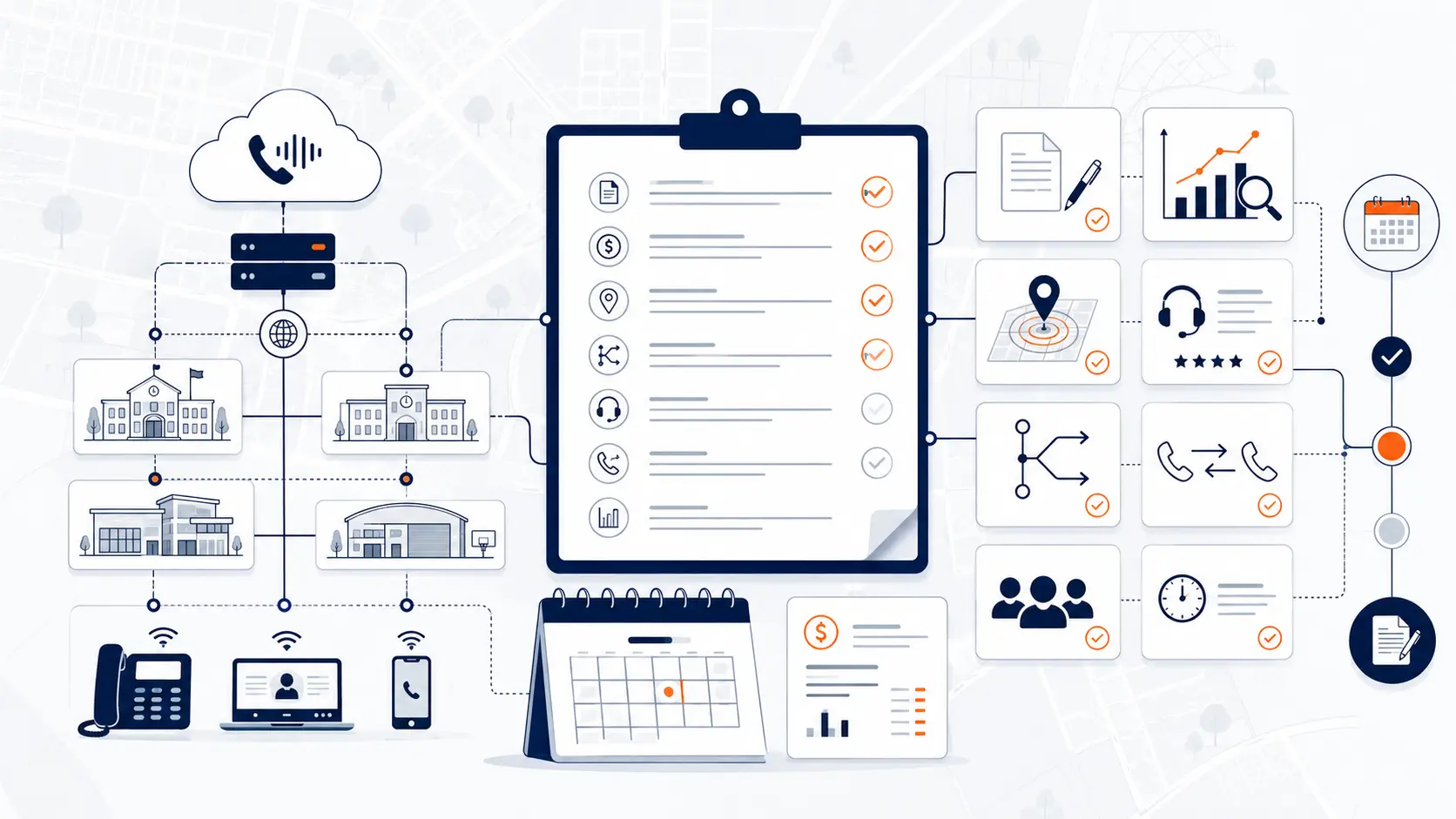
Planning resource: Use the District Phone System Review Checklist to compare pricing, routing, support, contracts, and readiness before making a decision.
Migration planning for cloud phone systems
A cloud migration should be planned before phones are shipped or numbers are ported. The work starts with documentation.
Step 1: Review the current system
Document the PBX, hosted platform, trunks, phone bills, numbers, extensions, phones, and current vendor agreements.
Step 2: Map buildings and departments
Create a practical list of campuses, buildings, departments, shared spaces, and phone locations.
Step 3: Rebuild call routing
Do not blindly copy old call flows. Review how calls should move today. Front office needs, transportation routing, district office paths, after-hours rules, and overflow handling may have changed.
Step 4: Review E911 location records
Confirm how the new cloud system will handle dispatchable location, on-site notifications, softphones, mobile apps, and phone moves.
Step 5: Plan number porting
Main numbers, direct numbers, fax lines, and specialty lines should be reviewed before porting. Do not assume every number on a bill should move the same way.
Step 6: Prepare staff
Staff should know how to transfer calls, check voicemail, use mobile tools, place emergency calls, and report phone issues.
Step 7: Test before go-live
Test routing, voicemail, auto attendants, failover, E911 procedures, and support contacts before the old system is retired.
Planning resource: Use the District Phone System Modernization Roadmap to organize review, design, deployment, porting, and support.
Number porting and carrier cleanup
Number porting is one of the highest-risk parts of a cloud phone migration. Schools often have years of carrier history spread across local service providers, SIP trunks, PRI circuits, analog lines, fax lines, and special-use numbers.
A district should identify:
- Main district numbers
- Campus main numbers
- Department numbers
- Direct inward dial numbers
- Fax numbers
- Elevator lines
- Alarm lines
- Gate or door lines
- Athletic or event lines
- Numbers forwarded from older services
- Numbers still printed on public materials
Carrier cleanup is just as important as the port. After migration, districts should verify which services remain active so they do not keep paying for circuits, lines, or services that are no longer needed.
Specialty lines may require separate review with qualified vendors. Elevator phones, alarm systems, fire panels, and gate systems should not be moved casually.
Cloud phone systems for multi-campus districts
Multi-campus districts need more than a hosted platform. They need a district-wide call design.
Cloud phone systems should support:
- Campus-specific main numbers
- Central office routing
- Department call queues or ring groups
- Shared services across campuses
- Internal extension dialing
- Building-level E911 location data
- Campus-by-campus migration
- Failover planning
- Standard naming and extension structure
- Centralized administration
A cloud system can make these easier, but poor planning can create messy routing that is harder to fix later.
For deeper planning, read Multi-Campus Phone Systems.
Cloud phone system vendor questions for schools
Districts should ask practical questions before selecting a cloud phone provider.
- How do you plan E911 for buildings, rooms, softphones, and mobile users?
- Can deployment be phased by campus?
- How do you handle number porting?
- What happens during cutover?
- What phones and devices are supported?
- Are classroom phones priced the same as staff users?
- Are common-area phones priced differently?
- Are we paying by extension, user, concurrent call path, device, or a blended model?
- What is included in support?
- What support is available during go-live?
- What happens during an internet outage?
- How are auto attendants and ring groups rebuilt?
- How do administrators make future changes?
- What is included in the proposal?
- What is not included?
The vendor conversation should produce a plan, not only a quote.
What a cloud phone system review should include
A district phone system review should look at both the technology and the operating reality.
K12 Phone Systems reviews:
- Current PBX or hosted VoIP system
- Phone bills and carrier services
- Buildings and campuses
- Main numbers and extensions
- Call routing and auto attendants
- E911 planning needs
- Analog lines and specialty services
- Hosted system pricing model
- Per-extension or per-user billing issues
- Porting requirements
- Cutover risks
- Network readiness
- Support expectations
Related planning resources
- District Phone System Modernization Roadmap
- District Phone System Review Checklist
- K-12 E911 Readiness Checklist
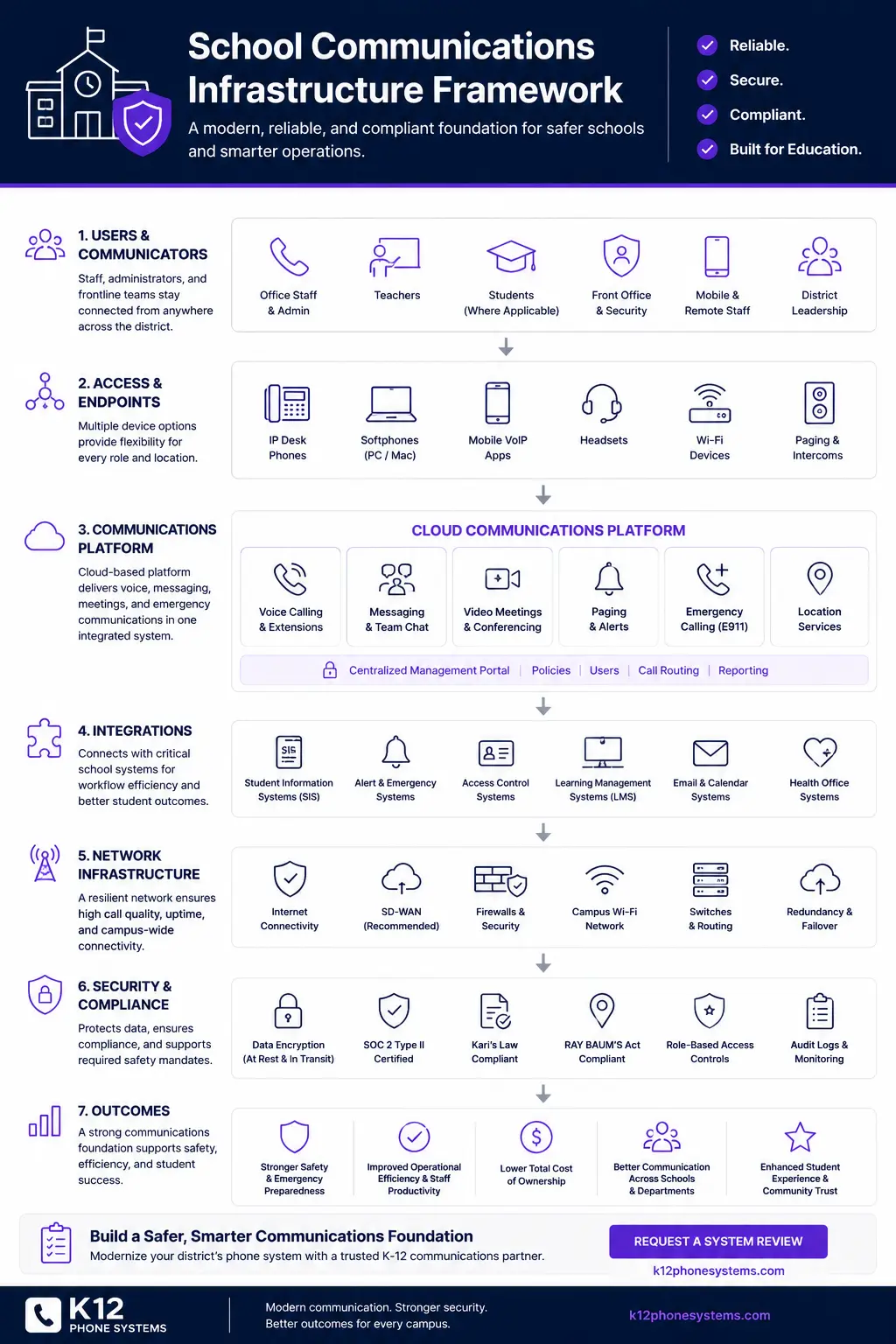
- School Communications Infrastructure Framework
- School Phone Systems
- PBX Replacement for Schools
Frequently asked questions
What is a cloud phone system for schools?
A cloud phone system is a hosted platform that manages calling, extensions, voicemail, routing, and phone administration for a school district. Instead of depending on a PBX cabinet in a school building, the call control platform runs in provider-managed infrastructure.
Are cloud phone systems better than legacy PBX systems?
They can be, but only when planned well. Cloud systems can reduce hardware dependence and centralize administration. They still require network readiness, E911 planning, number porting, routing design, user planning, and support.
Does a cloud phone system automatically solve E911?
No. E911 readiness still depends on direct 911 dialing, on-site notification, dispatchable location data, accurate device records, softphone handling, and ongoing maintenance.
Can a school district keep existing phone numbers?
Usually, many numbers can be ported, but every number should be reviewed before migration. Districts should identify main numbers, campus numbers, department numbers, fax numbers, specialty lines, and numbers that may still be printed or published.
Can cloud phone systems be phased by campus?
Yes. Many districts benefit from phased deployment by campus, department, or building group. Each phase should include routing review, E911 review, staff readiness, testing, and go-live support.
Are per-extension cloud phone plans good for schools?
Sometimes, but they can become expensive when a district has many classroom, office, and common-area phones. Districts should review whether pricing matches real usage or simply charges for every extension.
What network requirements matter for cloud phones?
Internet reliability, switching, cabling, firewall rules, Power over Ethernet, Wi-Fi quality, battery backup, and failover planning all matter. The phone system depends on the network path between users and the hosted platform.
What happens if the internet goes down?
That depends on the design. Districts may use backup internet, call forwarding, failover routing, mobile apps, or alternate call handling. These options need to be planned before launch.
How long does a cloud phone migration take for schools?
The timeline depends on district size, documentation, number porting, E911 planning, network readiness, hardware availability, and campus schedule. A small site may move quickly, while a multi-campus district may need phased rollout.
What should we send before requesting a cloud phone system review?
Send anything available: phone bill, current vendor proposal, campus list, extension list, phone inventory, main numbers, call flow notes, E911 questions, or a summary of the problems you are trying to solve.
References
- Multi-line Telephone Systems 911 Requirements
- E-Rate Schools and Libraries Program
- E-Rate Program Overview
Ready to review cloud phone system options for your district?
Share your current phone setup, phone bill, campus list, or vendor proposal. We will help identify risk areas, pricing concerns, migration considerations, and practical next steps for hosted school phone infrastructure.