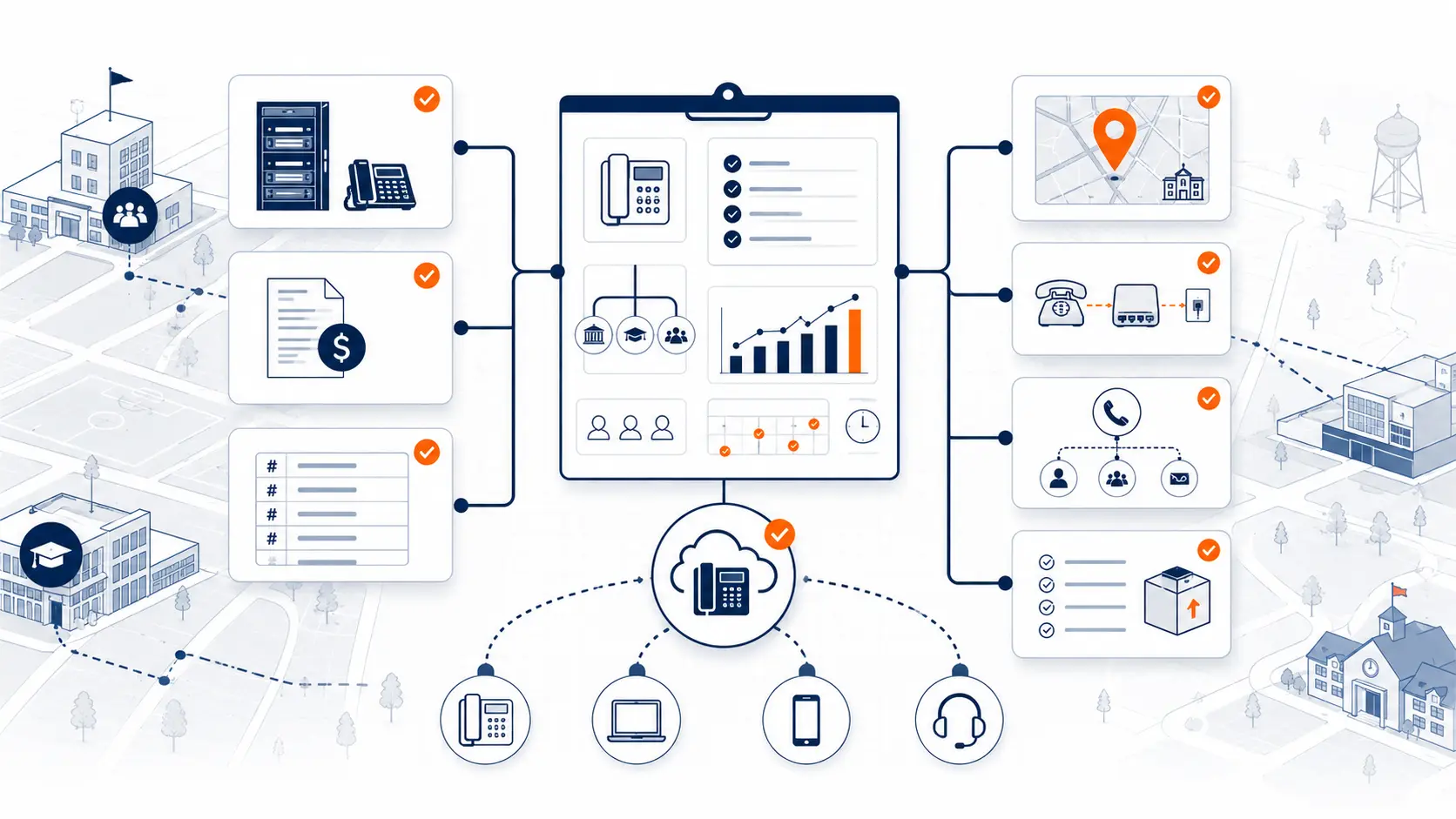
PBX replacement in a school district is not just a phone hardware swap. It affects front offices, emergency calling, main numbers, extensions, carrier records, campus routing, cutover timing, staff readiness, and support. A district replacing an aging phone system needs a plan that accounts for buildings, people, numbers, and the operational reality of a school day.
Many school PBX systems were installed when most staff worked from fixed desks, every building had a predictable main office call path, and emergency calling rules were less complex. Today, district phone systems have to support front offices, classrooms, administration, transportation, maintenance, mobile staff, E911 planning, and phased migration. That changes how a replacement project should be reviewed.
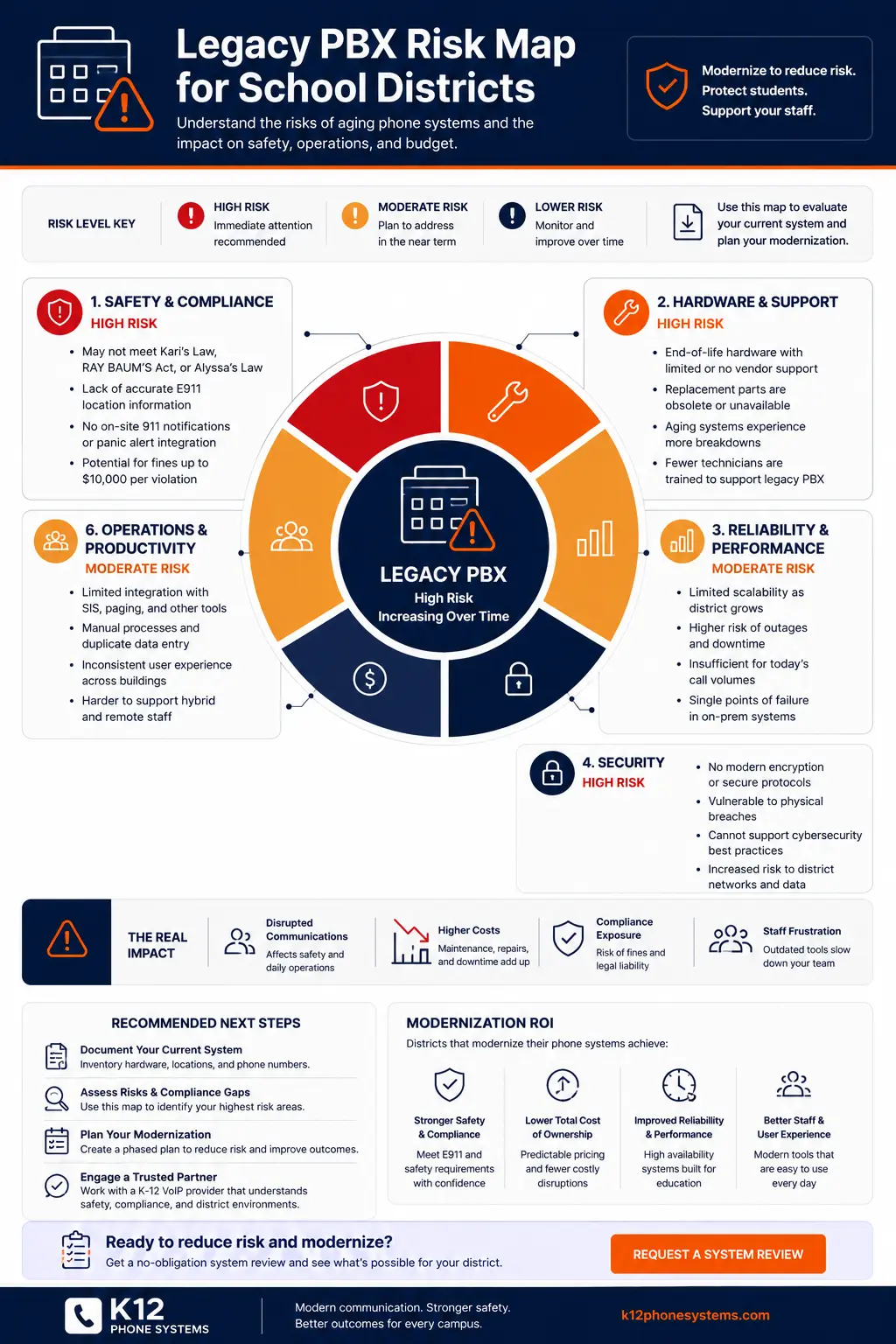
Request System Review | Download the Legacy PBX Risk Map
What PBX replacement means for schools
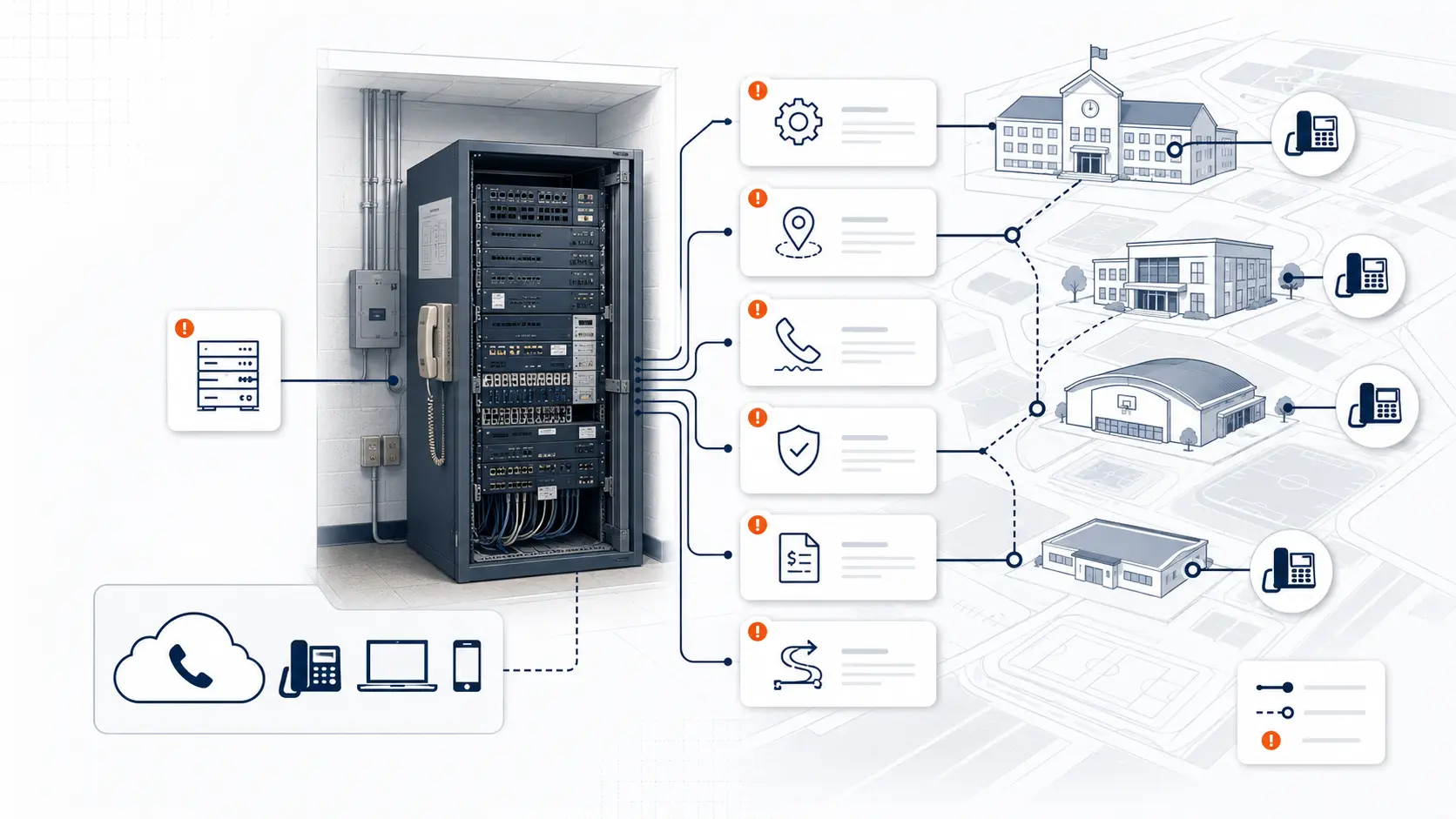
A PBX, or private branch exchange, is the phone system that manages internal extensions, inbound calls, outbound calls, transfers, voicemail, and call routing. In many schools, the PBX was once a physical box or cabinet located in a district office, school office, equipment closet, or server room. It connected desk phones to outside phone lines and managed how calls moved through the district.
PBX replacement means moving away from that legacy system toward a current phone environment. The replacement could be hosted, cloud-based, hybrid, or built around new on-site equipment. For many districts, hosted phone systems are attractive because they reduce dependence on aging PBX hardware and make administration easier across multiple buildings.
The replacement decision affects far more than desk phones. A school district phone system supports main numbers, direct numbers, classroom phones, front office call flow, auto attendants, ring groups, voicemail, analog services, emergency calling, and staff access. It may touch several departments at once, including technology, operations, administration, finance, and facilities.
A good PBX replacement plan should account for:
- Buildings and campuses
- Main numbers and direct inward dial numbers
- Existing extensions
- Front office call routing
- Auto attendants and ring groups
- E911 and dispatchable location planning
- Analog lines and specialty services
- Number porting sequence
- Network readiness
- Phone placement
- Staff readiness
- Cutover timing
- Post-launch support
That is why PBX replacement for schools should start with a current-state review. The goal is not to replace equipment blindly. The goal is to understand what the district depends on today, what creates risk, and what needs to be planned before a cutover.
Why school districts replace legacy PBX systems
School districts usually replace PBX systems after a pattern becomes hard to ignore. The system may still place calls, but support, reliability, emergency calling, and change management become harder each year.
Aging hardware is a common trigger. Older PBX systems may depend on cards, cabinets, handsets, or software versions that are no longer easy to support. Replacement parts may be hard to locate. The technicians who understand the system may be retired, unavailable, or expensive. Documentation may be incomplete.
Analog line dependence is another driver. Many older school phone systems rely on analog lines for voice, fax, alarms, elevators, gates, or specialty devices. Some of those lines may still be needed, but they should be reviewed separately instead of being treated as one undifferentiated phone bill.
E911 planning has moved PBX replacement higher on the priority list for many districts. Federal rules related to multi-line telephone systems address direct 911 dialing, notification, and dispatchable location. Districts should review the official FCC and 911.gov materials, then confirm obligations with counsel and relevant public safety authorities [1][2].
| Replacement driver | What it may indicate | Planning question |
|---|---|---|
| Aging PBX hardware | The system depends on old equipment, parts, or software | What components would be hard to repair during a failure? |
| Analog lines | The district may be paying for services that need separate review | Which analog lines are voice, fax, alarm, elevator, gate, or specialty services? |
| E911 location uncertainty | Emergency calling records may not match buildings or rooms | Can each phone report a useful dispatchable location? |
| Multi-campus routing problems | Calls may not reach the right office, campus, or department | How should main numbers and campus call paths work after replacement? |
| Outage history | The district may have a single point of failure | What happens if the PBX, carrier, internet, or building connection fails? |
| Carrier billing complexity | Old services may be buried in confusing bills | Which services are still active, needed, or ready for removal? |
| Staff mobility needs | Staff may need district-managed calling away from a fixed desk | How should softphones, mobile apps, and desk phones be assigned? |
A PBX may still appear functional right up to the moment it creates an urgent problem. A proactive review gives the district more control over timing, budget discussion, and migration path.
Common risks in aging school PBX systems
Aging school PBX systems create risk in several ways. Some risks are technical. Some are operational. Some are tied to institutional knowledge that is no longer available.
The most obvious risk is hardware failure. A PBX that depends on aging cards, power supplies, handsets, or proprietary components may be hard to repair quickly. A district might find that a failed part is no longer stocked, or that only one outside technician understands the system.
The second risk is inconsistent configuration. A district may have one call flow at the elementary school, another at the middle school, and a different routing pattern at the high school. Years of small changes can create a system that works only because staff have memorized its quirks.
The third risk is poor documentation. Extension lists may be out of date. Phone labels may not match actual routing. Main numbers may forward through old carrier services. Ring groups may include staff who have changed roles. Voicemail boxes may exist for people who no longer work in the district.
Aging PBX systems may create risk in these areas:
- Single points of failure
- Unsupported hardware
- Inconsistent campus configurations
- Unknown call flows
- Inaccurate extension records
- Main number routing gaps
- Poor documentation
- Difficult after-hours changes
- Limited visibility for IT teams
- Emergency calling limitations
Planning resource: Use the Legacy PBX Risk Map for School Districts to review safety, support, reliability, security, cost, and operational risk areas.
Aging systems can stay in place for years when budgets are tight, but the cost of waiting is rarely just financial. The larger issue is loss of control. A district that waits until the PBX fails has fewer choices than a district that reviews the system before a failure occurs.
PBX replacement and E911 planning
PBX replacement should include E911 planning from the beginning. Emergency calling cannot be treated as a final checkbox after the phones are installed.
Kari's Law and RAY BAUM'S Act address direct 911 dialing, notification, and dispatchable location for covered multi-line telephone systems. The FCC explains that Kari's Law includes direct 911 dialing and notification capabilities, and RAY BAUM'S Act rules address dispatchable location information for 911 calls [1]. 911.gov provides a public overview of these laws and their background [2].
For school districts, E911 planning may involve:
- Direct 911 dialing without a prefix
- On-site notification to the right staff or location
- Dispatchable location records
- Building, floor, room, and shared-space mapping
- Softphone and mobile app treatment
- Testing before and after cutover
- Ongoing location data maintenance
This guide provides technical planning information, not legal advice. Districts should review compliance requirements with qualified counsel, public safety authorities, and appropriate state or local agencies.
During PBX replacement, a district should review whether existing emergency calling records match actual phone locations. A desk phone moved from one room to another may still have old location data. A classroom extension may point to a main office. A portable classroom may not be mapped clearly. A softphone may be tied to a user rather than a fixed room.
Hosted systems can make some administration easier, but they do not remove the need for clean records. The district still needs accurate building data, device assignments, policies for mobile users, and a process for moves, adds, and changes.
For a deeper planning page on this topic, see E911 Compliance for Schools. To review emergency calling readiness before migration, use the K-12 E911 Readiness Checklist.
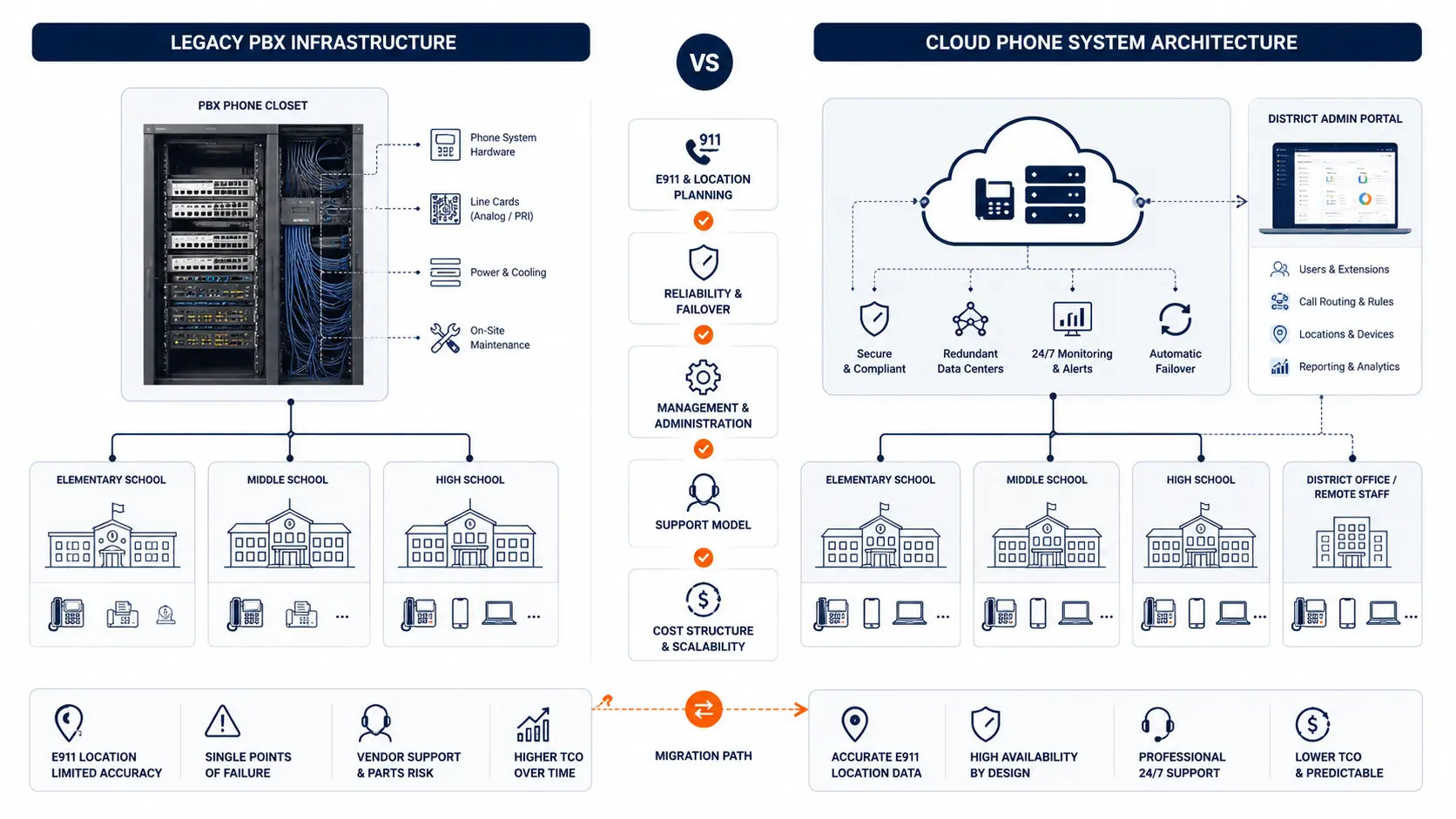
Hosted phone systems vs legacy PBX for schools
Many districts compare a hosted phone system against keeping or replacing the legacy PBX. The right answer depends on the current system, building layout, staff needs, network readiness, support expectations, and timing.
A hosted phone system can reduce dependence on on-site PBX hardware. It can make administration more consistent across buildings. It can support desk phones, softphones, and mobile apps when configured correctly. It may simplify changes that used to require a PBX technician.
A hosted system still needs planning. The district needs to review call flow, E911, number porting, network readiness, device placement, staff readiness, and support. Moving to hosted phones does not automatically clean up years of routing history.
| Area | Legacy PBX | Hosted phone system |
|---|---|---|
| Hardware | Depends on on-site equipment, cards, cabinets, and power | Hosted platform reduces on-site PBX dependence |
| Administration | Changes may require PBX-specific knowledge | Centralized portal can simplify district-wide updates |
| Scaling | New users or buildings may require hardware changes | Adds and changes can be software-based when planned well |
| Remote access | Often limited or inconsistent | Softphones and mobile apps may support district-managed calling |
| E911 planning | Location records may be old or hard to audit | Location records can be centralized, but still need maintenance |
| Failover planning | May depend on local PBX and carrier paths | Can support planned routing options, subject to design |
| Support | May rely on specialized technicians | Support model should be defined before migration |
| Number management | Carrier records may be scattered | Porting plan can consolidate number management |
| Migration requirements | Old call flows may be undocumented | Migration requires discovery, mapping, testing, and staff readiness |
| Cost visibility | Legacy bills may include old services and unclear charges | Hosted billing may be clearer, but proposal scope still needs review |
The strongest replacement plans do not start with a platform decision. They start with a review of the environment the district already has.
What to document before replacing a school PBX
A PBX replacement project will move faster when the district has clean documentation. Many districts will not have every item ready at the start. That is normal. The point is to identify what exists, what is missing, and what should be confirmed before cutover.
Useful documentation includes:
Current phone system
- Current PBX or phone system model
- System location
- Support provider
- Known support issues
- Software or firmware status if known
- Any known end-of-life concerns
Carrier services and billing
- Current phone bills
- Main numbers
- Direct inward dial numbers
- SIP trunks, PRI, POTS, or analog services
- Toll-free numbers if used
- Fax lines
- Carrier contracts and renewal dates
Call flow and users
- Extensions
- Auto attendants
- Ring groups
- Front office call flow
- Department call paths
- Voicemail boxes
- After-hours routing
- School closing or emergency message procedures
Buildings and devices
- Building and campus list
- Phone locations
- Classroom phones
- Office phones
- Shared-space phones
- Portable classroom phones
- E911 records
- Floor plans if available
Specialty services
- Analog lines
- Fax machines
- Alarms
- Elevators
- Gates
- Door systems
- Intercom tie-ins if present
- Any device that depends on a phone line
Deployment constraints
- Internet and network readiness
- Cabling constraints
- Power over Ethernet availability
- Cutover timing constraints
- Testing windows
- Staff training needs
- School calendar limits
The District Phone System Review Checklist is designed to help organize these items before a vendor conversation or internal planning meeting.
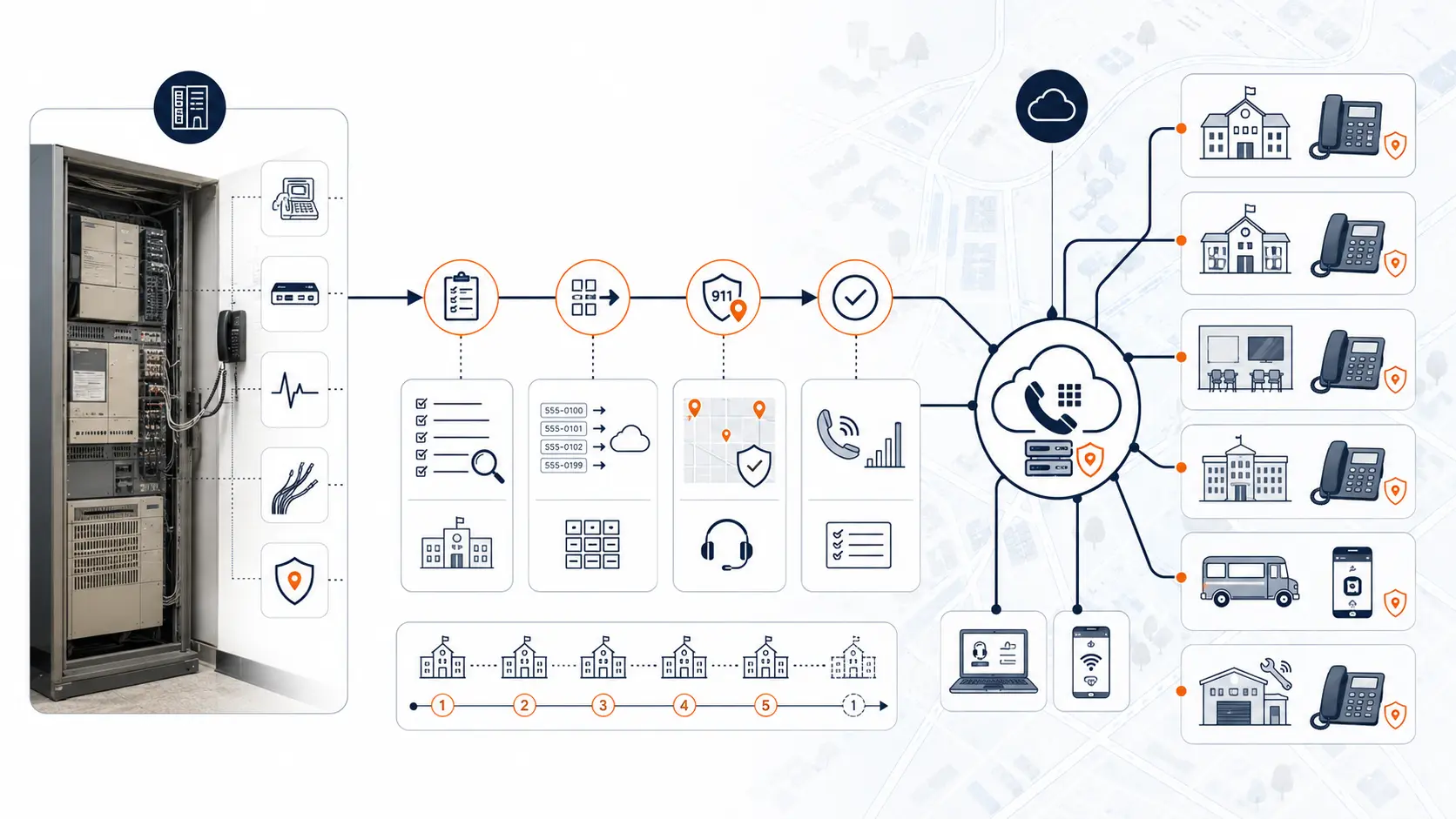
Planning a phased PBX replacement
Many school districts should avoid replacing every phone at once. A phased approach can reduce disruption, give staff time to adjust, and let the district test the new system before the entire environment is moved.
A phased replacement might start with one building, one department, or one campus group. The first phase can validate call routing, phone labels, device placement, E911 records, number porting process, and support response. Lessons from the first phase can improve the next phase.
Common rollout models include:
- Campus-by-campus rollout
- Department-by-department rollout
- Pilot building approach
- Front office first, then classroom and support areas
- District office first, then campuses
- High-risk buildings first, then lower-risk buildings
Cutover windows matter in schools. A change that might be simple in a commercial office can create problems during arrival, dismissal, testing weeks, registration periods, board meeting dates, or athletic events. The phone system plan should account for the school calendar.
A phased PBX replacement plan should address:
- Cutover windows
- Number porting sequence
- Temporary forwarding
- Testing and rollback planning
- Staff readiness
- Front office coverage during cutover
- E911 verification
- Post-launch support
The District Phone System Modernization Roadmap can help district teams plan review, design, deployment, porting, and support. Districts with several buildings should use the Multi-Campus Phone Systems guide when planning routing and rollout.
Analog line replacement considerations
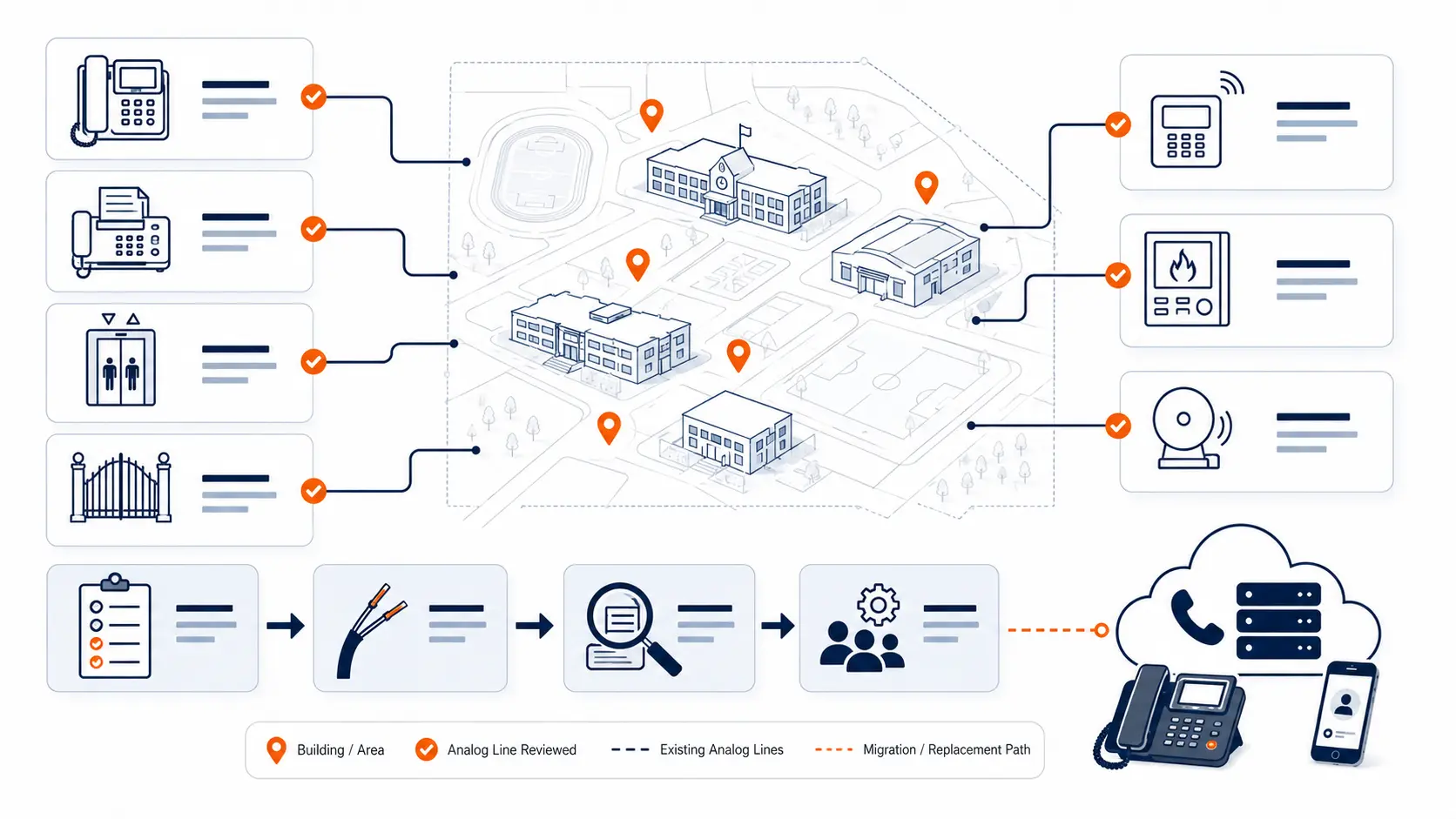
Analog lines still appear in many school environments. Some are obvious. Some are hidden in old bills, closets, alarm panels, elevators, gates, fax devices, or specialty systems. A PBX replacement project should not assume every analog line can be removed or replaced in the same way.
Analog services may include:
- Voice lines
- Fax lines
- Elevator lines
- Alarm lines
- Gate or door systems
- Fire alarm or security panel lines
- Modems or specialty devices
- Emergency backup lines
Each line should be inventoried separately. A classroom voice line and an elevator line are not the same type of risk. Fax may be replaced with a digital workflow in some cases. Alarm and elevator lines may require review by qualified vendors, code officials, or service providers. Gate and door systems may have their own support requirements.
A safe analog line review asks:
- What is this line connected to?
- Who owns the device or service?
- Is it voice, fax, alarm, elevator, gate, or specialty use?
- Is there a contract tied to it?
- Is it required by code, policy, or a third-party vendor?
- Can it be replaced, migrated, or retired?
- Who must approve the change?
- How will it be tested?
Analog line replacement schools projects often become more complex than expected when old services were never documented. That is one reason to review bills, circuits, closets, and specialty devices before finalizing the phone system plan.
Number porting and call routing during PBX replacement
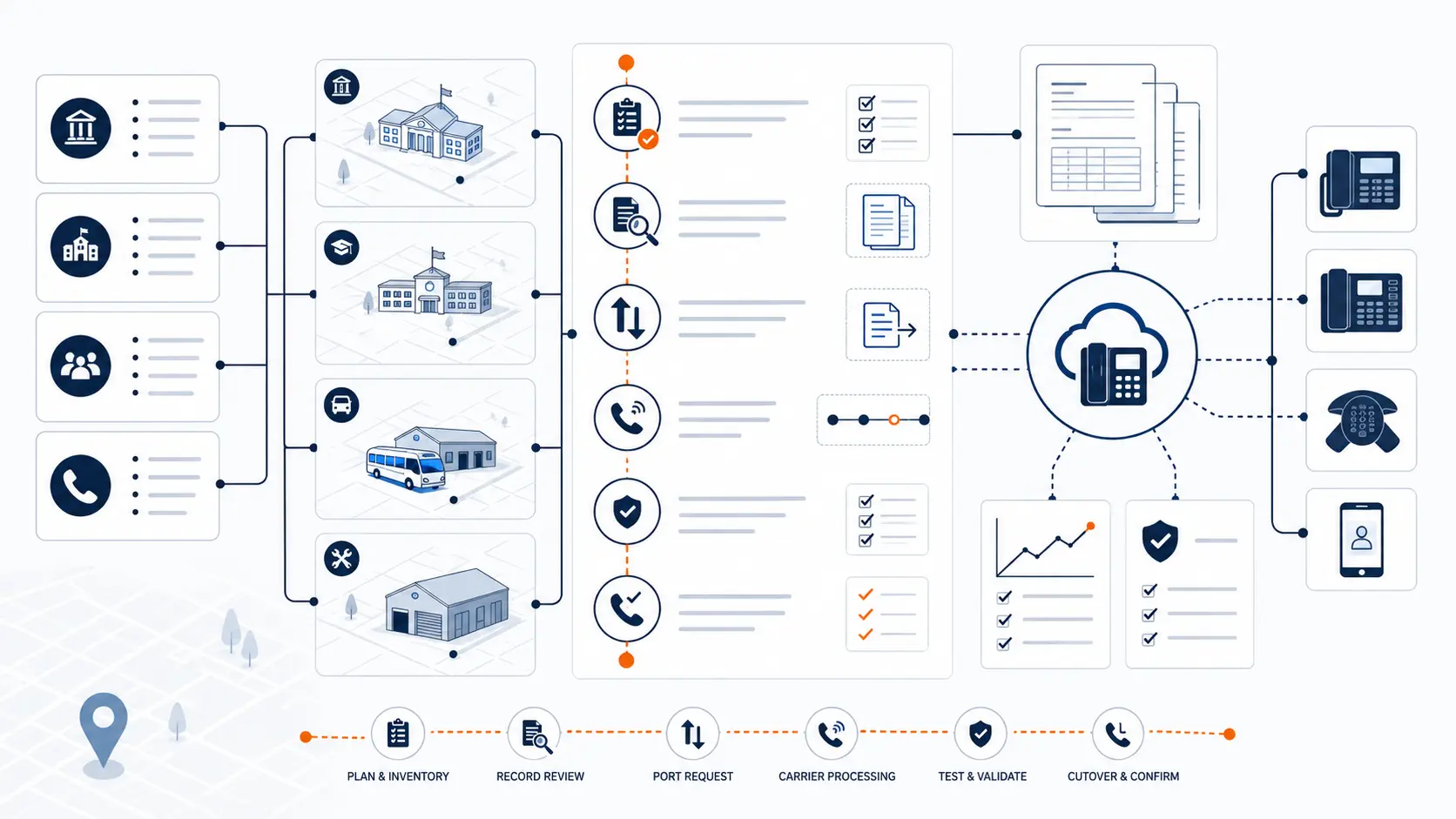
Number porting is one of the most sensitive parts of PBX replacement. District main numbers, campus numbers, department numbers, and direct numbers may be tied to printed materials, websites, parent communications, transportation messages, and public directories.
A district should not treat number porting as a background task. It should be a planned sequence.
Numbers to review may include:
- District main number
- Campus main numbers
- Department numbers
- Direct inward dial numbers
- Fax numbers
- Toll-free numbers
- Athletic department numbers
- Transportation numbers
- Maintenance or facilities numbers
- Emergency or after-hours numbers
Call routing should be reviewed at the same time. Old PBX systems often contain years of routing changes. Some may be useful. Some may be outdated. Some may be known only to front office staff.
During replacement, the district should review:
- Main number routing
- Campus call paths
- Auto attendant menus
- Ring groups
- Department transfers
- Voicemail handling
- After-hours messages
- Temporary forwarding
- Cutover testing
- Who answers calls during transition
This work is where school phone system migration becomes operational. A cutover can be technically successful and still create frustration if parents cannot reach the right front office, transportation calls route to the wrong staff, or voicemail boxes were not rebuilt correctly.
Network readiness for hosted phone systems
Hosted phone systems depend on the district network. That does not mean every district needs a major network rebuild, but it does mean network readiness should be reviewed before deployment.
The review should include internet reliability, LAN switching, cabling, power, and failover. The district should understand where phones will connect, how they will receive power, and what happens during a network or internet problem.
Key areas include:
- Internet reliability
- LAN and switching
- Cabling
- Voice network planning
- Power over Ethernet
- Battery backup and power planning
- Failover options
- Coordination with district IT
Power over Ethernet, often called PoE, allows network switches to power compatible desk phones through Ethernet cabling. This can simplify phone placement, but it requires switches that support enough power for the planned phones.
Wi-Fi is not always ideal for desk phones. It may work for softphones or mobile apps in some cases, but fixed phones in offices and classrooms are often better served by wired connections when the building supports it.
Failover planning should be plain and practical. The district should know what happens if the internet connection fails, if a building loses power, if a carrier issue occurs, or if a network switch fails. Not every risk can be eliminated, but the district should know how calls are expected to behave.
What to ask vendors before replacing a school PBX
Vendor conversations should go beyond price and phone models. The district needs to understand how the vendor handles school-specific deployment, E911 planning, number porting, cutover timing, and support.
Useful questions include:
- Have you worked with multi-campus school environments?
- How do you handle E911 planning?
- Can we phase deployment by campus?
- How do you manage number porting?
- What happens during cutover?
- What phones and devices are supported?
- How are auto attendants and ring groups rebuilt?
- How do softphones and mobile apps affect E911?
- What does support look like after launch?
- What is included in the proposal?
- What is not included?
- Who documents the final call flow?
- Who trains administrators?
- Who handles changes after go-live?
- How are analog and specialty lines reviewed?
- What information do you need from us before design?
A good vendor should be willing to discuss the district’s actual environment before pushing a generic quote. If the proposal does not address buildings, numbers, E911, porting, devices, and cutover, the district may not have enough information to compare options.
What a PBX replacement review should include
A PBX replacement review helps district leaders move from uncertainty to a practical plan. It does not require a perfect inventory at the start. It starts with what the district has and identifies what else needs review.
K12 Phone Systems reviews:
- Current PBX and carrier setup
- Phone bills
- Buildings and campuses
- Main numbers and extensions
- Call routing
- E911 planning needs
- Analog lines and specialty services
- Porting requirements
- Cutover risks
- Hosted system readiness
- Support expectations
The review should produce useful findings, not just a product recommendation. District leaders should gain a clearer view of current-state risk, replacement scope, and the likely migration path.
A review may help answer questions such as:
- What is still usable?
- What is fragile?
- Which numbers matter most?
- Which analog lines need separate review?
- Which buildings should move first?
- What E911 records need cleanup?
- What cutover windows make sense?
- What support is needed before and after launch?
Related planning resources
- Legacy PBX Risk Map for School Districts
- District Phone System Modernization Roadmap
- District Phone System Review Checklist
- K-12 E911 Readiness Checklist
- School Phone Systems
Frequently asked questions
What is PBX replacement for schools?
PBX replacement for schools is the process of moving from an aging school phone system to a newer phone environment. It can include hosted phone service, new devices, number porting, call routing, E911 planning, staff readiness, and support planning.
When should a school district replace its PBX?
A district should review replacement when the PBX is hard to support, parts are difficult to find, technician knowledge is limited, call routing is inconsistent, E911 records are unclear, or the system creates outage risk.
Can schools keep existing phone numbers?
In many cases, yes. Existing numbers can often be ported to a new provider or platform, subject to carrier records, account status, and porting requirements. The district should review main numbers, campus numbers, department numbers, fax numbers, and direct numbers before cutover.
Can PBX replacement be phased by campus?
Yes. Many districts benefit from phased replacement by campus, building group, department, or pilot site. A phased approach can reduce disruption and give the district time to test call routing, E911 records, staff readiness, and support.
Does replacing a PBX affect E911?
Yes. PBX replacement should include E911 review. Direct 911 dialing, on-site notification, dispatchable location, softphone behavior, and testing should be reviewed before cutover. Districts should confirm legal obligations with qualified counsel and relevant public safety authorities.
What happens to analog lines during PBX replacement?
Analog lines should be inventoried separately. Some may be retired, some may be migrated, and some may require review by qualified vendors or code officials. Elevator, alarm, gate, fax, and specialty lines should not be treated the same way as normal voice lines.
Are hosted phone systems better than legacy PBX systems?
Hosted phone systems can reduce dependence on aging PBX hardware and make administration easier across buildings. They still require planning for network readiness, call flow, E911, number porting, devices, staff readiness, and support.
How long does school PBX replacement take?
The timeline depends on the number of campuses, phone count, carrier records, porting needs, E911 records, network readiness, and cutover plan. A single building may move faster than a multi-campus district with many numbers, analog lines, and complex routing.
What should districts document before replacing a PBX?
Districts should gather phone bills, main numbers, direct numbers, extensions, building lists, call flows, auto attendants, ring groups, phone locations, E911 records, analog lines, specialty services, and cutover constraints.
What should we send before requesting a PBX replacement review?
Send what you have. Helpful items include a current phone bill, vendor proposal, system notes, extension list, campus list, main number list, call flow notes, E911 concerns, and known support or outage issues.
References
- Multi-line Telephone Systems 911 Requirements
- Kari's Law and RAY BAUM'S Act
- E-Rate Eligible Services List
- CISA K-12 School Security Guide Product Suite
Ready to review your school PBX replacement options?
Share your current phone setup, phone bill, campus list, or vendor proposal. We will help identify risk areas, migration considerations, and practical next steps for replacing aging school phone infrastructure.