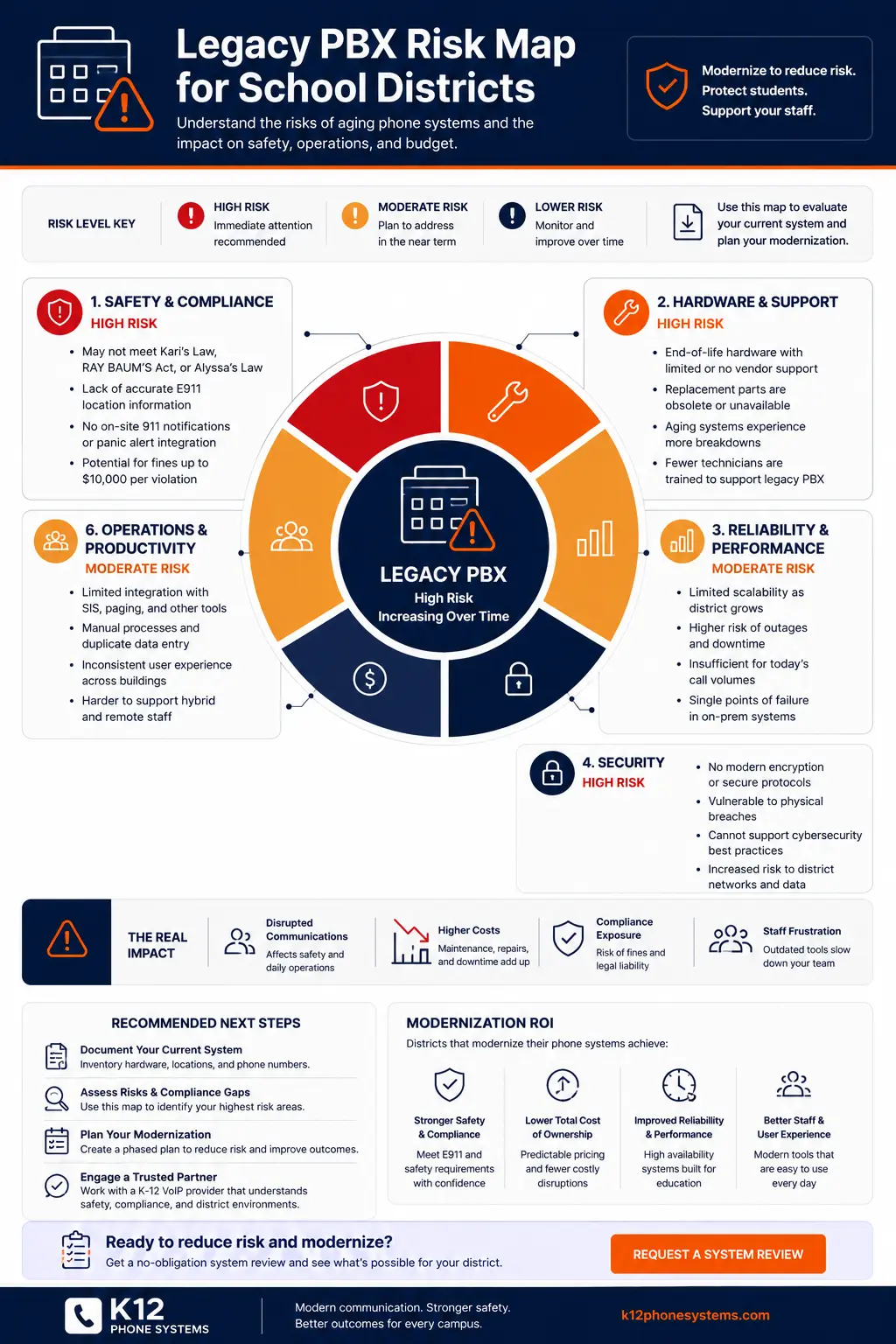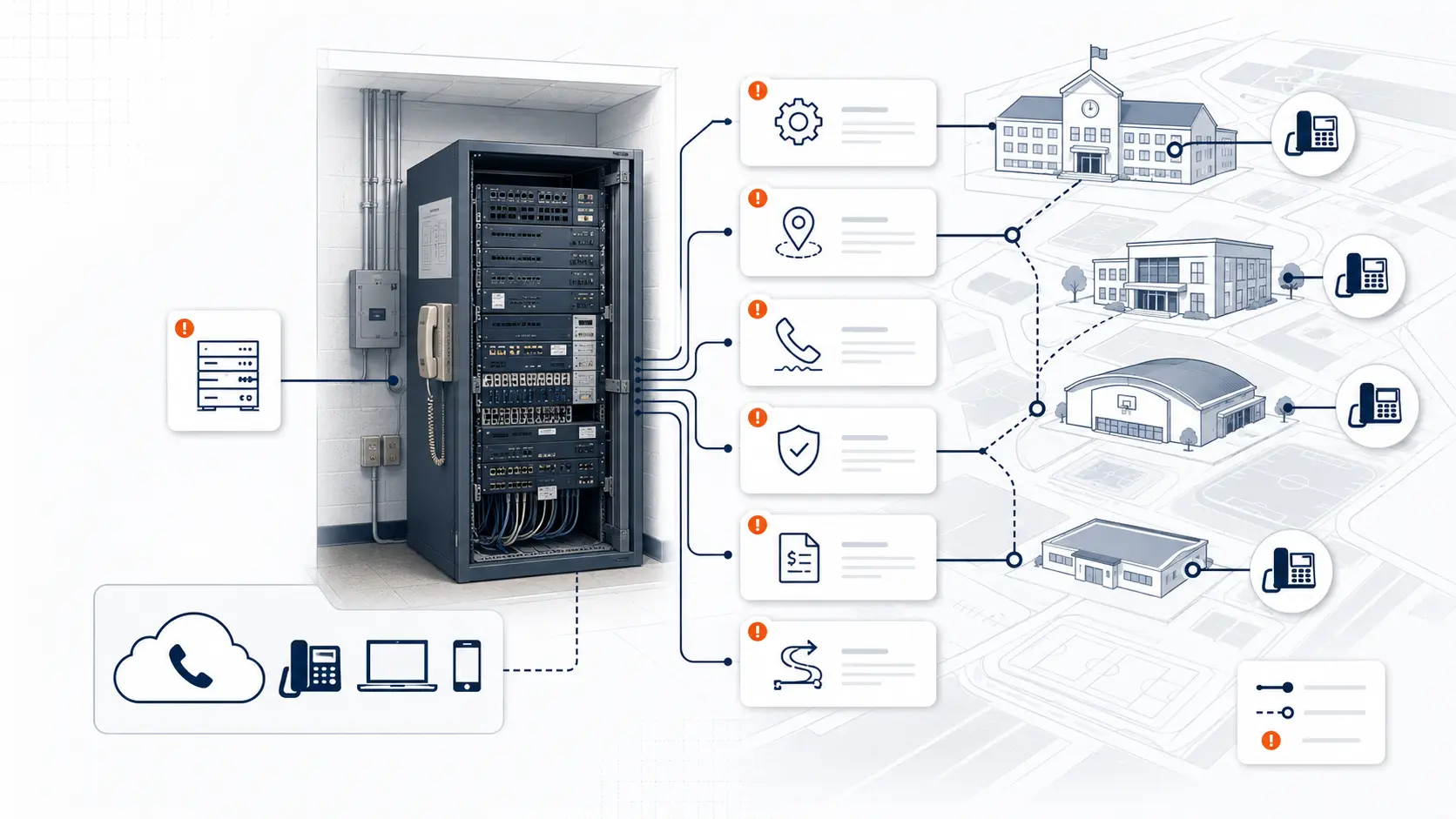
A legacy PBX can keep working for years after everyone knows it should be replaced. That is what makes it risky. The system may still pass calls, ring front office phones, and support a few familiar extension patterns, but the district may be carrying hidden exposure in E911 location data, analog lines, vendor support, number routing, documentation, outage recovery, and renewal costs.
For school districts, PBX risk is not only about old equipment in a closet. It affects front offices, classrooms, campus main numbers, emergency calling, transportation, maintenance, administrative buildings, and every person who expects the district phone system to work during a normal school day.
This guide is for technical planning and general education only. It is not legal advice. Districts should review legal, procurement, and compliance obligations with qualified counsel, public safety authorities, and appropriate state or local agencies.
Request System Review | Download the Legacy PBX Risk Map
What legacy PBX risk means for schools
A PBX, or private branch exchange, is the phone system that manages internal extensions, call routing, voicemail, outside lines, auto attendants, ring groups, and transfers. Many school districts still use older PBX platforms, hybrid systems, or hosted VoIP PBX installations that were installed years ago and never reviewed against current district needs.
Legacy PBX risk shows up when the phone system becomes harder to maintain, harder to document, harder to change, or harder to trust. Some districts face this with old on-premises hardware. Others face it with an existing hosted VoIP PBX that is technically newer but still expensive, poorly configured, or priced by extension in a way that does not fit school usage.
The main question is not whether the system still works today. The better question is whether the district understands what happens when something changes, fails, renews, moves, or needs to be tested.
Why legacy PBX systems become risky
School phone systems often stay in place for a long time. A PBX may have been installed when the district had fewer buildings, fewer mobile staff, fewer safety requirements, and simpler call routing. Over time, campuses change, staff move, portables are added, departments shift, and emergency calling expectations become more detailed.
That creates a gap between the phone system as originally installed and the phone system the district now needs.
| Risk driver | What it may indicate | Planning question |
|---|---|---|
| Aging PBX hardware | Replacement parts or vendor support may be limited | What happens if the system fails during the school year? |
| Unknown call flows | Main numbers and ring groups may be poorly documented | Can the district rebuild routing during a migration? |
| E911 location uncertainty | Phones may not map cleanly to buildings, floors, rooms, or areas | Can responders receive useful location data? |
| Analog line dependence | Fax, alarm, elevator, gate, or specialty lines may be mixed into the phone environment | Which lines can move, and which require separate review? |
| Carrier billing complexity | The district may pay for services it no longer understands or uses | What is still needed, and what can be retired? |
| Per-extension hosted VoIP pricing | The district may pay for every extension instead of real usage | Are inactive, low-use, or common-area phones inflating cost? |
| Support knowledge loss | Only one technician or vendor may understand the system | Who can troubleshoot it quickly during an outage? |
The biggest operational risks
Single points of failure
Older PBX systems may depend on one server, one appliance, one carrier handoff, one closet, one legacy card, or one undocumented configuration. If that piece fails, the district may not have a clean recovery path.
This matters most when the failure affects main numbers, front office phones, emergency calling, or district administration lines. A phone outage during a school day creates operational pressure fast.
Poor documentation
Many districts know how calls are supposed to work, but not how the system is actually configured. The original installer may be gone. The vendor may have changed. Internal IT staff may have inherited a system they did not design.
Poor documentation creates risk during:
- number porting
- campus moves
- PBX replacement
- E911 review
- front office routing changes
- after-hours call handling changes
- outages
- vendor transitions
A district should not have to reverse-engineer its phone system during a migration.
Inaccurate extension records
Extension lists often become stale. A phone that used to be in one office may be moved to another room. A classroom extension may remain assigned to a staff member who changed buildings. A shared phone may not have a clear owner.
That creates both operational and emergency calling problems. Location records should reflect where the phone is, not where it used to be.
Main number routing gaps
District main numbers, campus main numbers, transportation lines, maintenance lines, and department numbers often have special routing rules. Some ring the front office first. Some overflow to another extension. Some route differently after hours.
If those routes are not documented, replacement becomes riskier than it needs to be.
E911 risk in older PBX environments
Emergency calling is one of the clearest reasons to review a legacy PBX. Federal rules around multi-line telephone systems include direct 911 dialing, notification, and dispatchable location requirements. The FCC describes requirements for Kari’s Law and RAY BAUM’S Act for MLTS environments, including direct dialing, notification, and dispatchable location information. [1]
For schools, this means the district should review whether the system can support:
- direct 911 dialing without a prefix
- on-site notification when 911 is dialed
- dispatchable location information
- building, floor, room, zone, or area mapping
- softphone and mobile app behavior
- testing with the proper public safety coordination
- ongoing location data maintenance
Older PBX systems may have been designed around a main billing address, not detailed campus location data. A high school, middle school, elementary school, administration building, bus depot, field house, portable classroom, and maintenance facility cannot all be treated like one generic address.
Use the K-12 E911 Readiness Checklist to review the emergency calling areas that should be discussed before replacement.
Hosted VoIP PBX installations can be risky too
A system does not have to be old hardware to deserve review. Some districts already moved from an on-premises PBX to a hosted VoIP PBX but still have problems.
Common issues include:
- paying by extension instead of real calling demand
- inactive users that remain billable
- classroom phones billed the same as heavy users
- mobile app seats that were enabled but never used
- administrative portals that are hard for IT to manage
- expensive support tiers
- carrier charges that were never cleaned up after migration
- old analog lines still sitting on separate bills
- poor call routing that copied the old PBX without improvement
- limited E911 documentation for softphones and mobile users
- renewal terms that lock in the same cost structure
Per-extension pricing can be a real problem for school districts. A district may have hundreds or thousands of extensions, but not all extensions use the phone system the same way. A front office phone, transportation office, district administrator, classroom wall phone, hallway phone, and shared device should not always be treated like identical high-usage business users.
If a district is paying for every extension, every device, every inactive user, and every low-use common-area phone as if they all create the same value, the district may be paying too much.
That does not mean every hosted VoIP system is wrong. It means existing VoIP installations should be reviewed before renewal, expansion, or replacement.
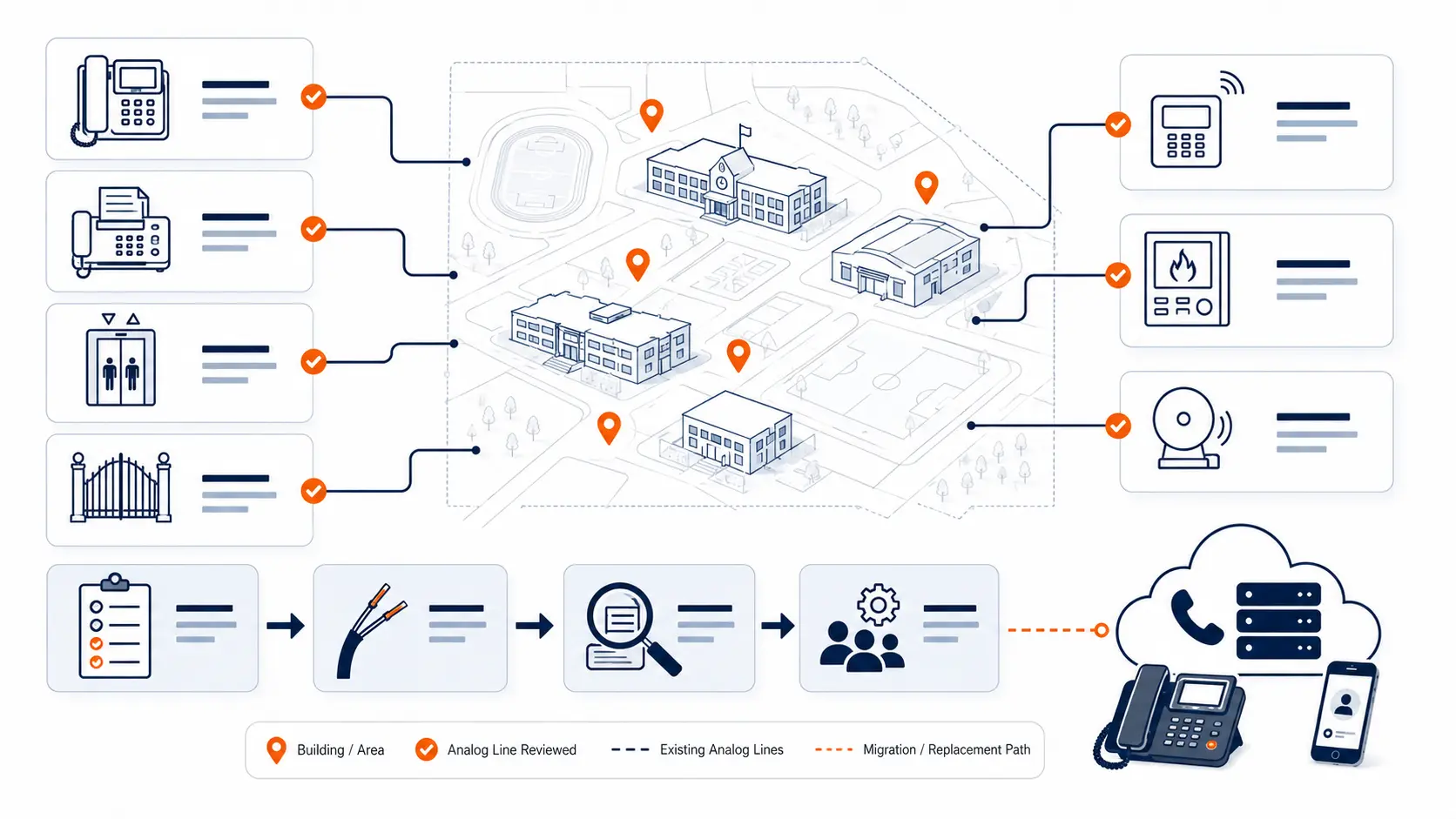
Analog lines and specialty services
Analog lines are often part of the legacy PBX conversation, but they should be reviewed carefully. Schools may still have analog services tied to:
- fax
- elevators
- fire alarms
- security alarms
- gates
- door systems
- modems
- bus garage lines
- maintenance areas
- backup lines
Some can be replaced or consolidated. Some may require a specialist, inspection, code review, or coordination with another vendor. A district should not assume every analog line can be moved into the hosted phone system without review.
The right first step is an inventory. The district should identify what each line does, where it is billed, what it connects to, who supports it, and what happens if it is disconnected.
Cost risk and renewal risk
Phone system risk is not only technical. It can be financial.
Legacy PBX and hosted VoIP environments can both create cost problems when no one reviews the full picture. Districts may pay for:
- old carrier trunks
- unused analog lines
- per-extension licenses
- support agreements
- hardware maintenance
- voicemail boxes
- direct numbers no one uses
- mobile app seats
- device rentals
- add-on features
- after-hours support tiers
- renewal increases
Before a district renews an existing phone agreement, it should ask:
- Which extensions are active?
- Which users need full licenses?
- Which phones are shared or low-use?
- Which analog lines are still required?
- Which carrier services remain after migration?
- Which costs are tied to support, devices, or add-ons?
- Which costs would change under a different pricing model?
- Which contract terms limit future changes?
Use the District Phone System Review Checklist to organize these questions before renewal or replacement.
Warning signs that a legacy PBX needs review
A district should review its PBX or hosted phone system when any of these are true:
- only one person knows how the system is configured
- the vendor support path is unclear
- the system requires frequent workarounds
- front office staff complain about transfers or call flow
- E911 location data is not easy to confirm
- phones have moved but location records were not updated
- main number routing is not documented
- analog line bills are hard to explain
- the district pays by extension but many extensions are low-use
- the current contract is approaching renewal
- the district is adding or consolidating buildings
- outages have happened during school hours
- the system cannot be changed quickly
- mobile staff rely on personal phones for district calls
These signs do not always mean immediate replacement is required. They do mean the district should review the system before a problem forces the timeline.
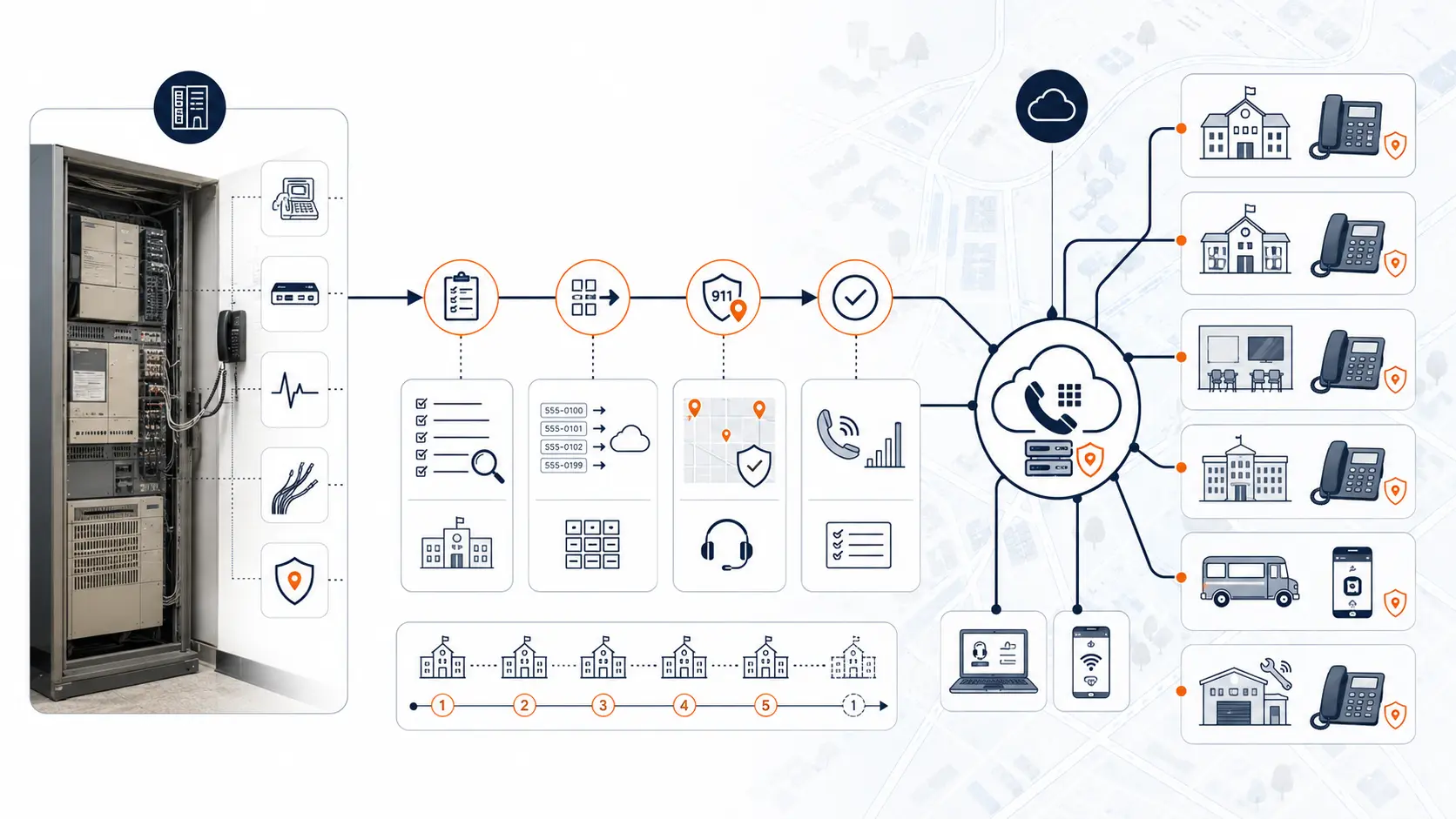
What to review before replacing the system
Before replacing a legacy PBX, the district should document the environment. A good review should include:
- PBX model or hosted platform
- current vendor
- current support agreement
- phone bills and carrier services
- main numbers
- direct inward dial numbers
- extension list
- auto attendants
- ring groups
- voicemail setup
- front office call flow
- building list
- phone location map
- E911 records
- analog lines
- specialty services
- internet and network readiness
- porting requirements
- school-year cutover timing
- staff training needs
The goal is not to create perfect documentation before asking for help. The goal is to gather enough information to understand risk, replacement scope, and migration sequence.
For a structured planning path, use the District Phone System Modernization Roadmap.
How a system review reduces risk
A phone system review helps turn uncertainty into a practical replacement plan. It does not need to start with a full RFP or finished inventory.
A review should help the district answer:
- What is fragile?
- What is still usable?
- What should be replaced?
- What needs special handling?
- What should be tested before cutover?
- What numbers must be protected?
- What E911 work needs to happen?
- What analog lines require separate review?
- What pricing model may be creating waste?
- What support model will the district need after launch?
K12 Phone Systems reviews current phone environments, hosted VoIP systems, legacy PBX systems, phone bills, call routing, E911 planning needs, analog line concerns, number porting requirements, cutover risks, and support expectations.
Related planning resources
- Legacy PBX Risk Map for School Districts
- District Phone System Review Checklist
- District Phone System Modernization Roadmap
- K-12 E911 Readiness Checklist
- School Phone Systems
- PBX Replacement for Schools
- Hosted VoIP for Schools: What Districts Should Review Before Renewal
- Why Per-Extension VoIP Pricing Can Cost School Districts Too Much
Frequently asked questions
What is legacy PBX risk in a school district?
Legacy PBX risk is the operational, financial, support, E911, and migration risk created when a school phone system is aging, poorly documented, hard to support, expensive to renew, or not aligned with current district needs.
Does legacy PBX risk only apply to old on-premises phone systems?
No. Existing hosted VoIP PBX installations can create risk too, especially when the district pays by extension, carries unused licenses, has poor routing, lacks E911 documentation, or is approaching a renewal without reviewing usage.
When should a school district review its PBX?
A district should review its PBX before renewal, replacement, building changes, E911 updates, carrier changes, major outages, analog line retirement, or any phased migration project.
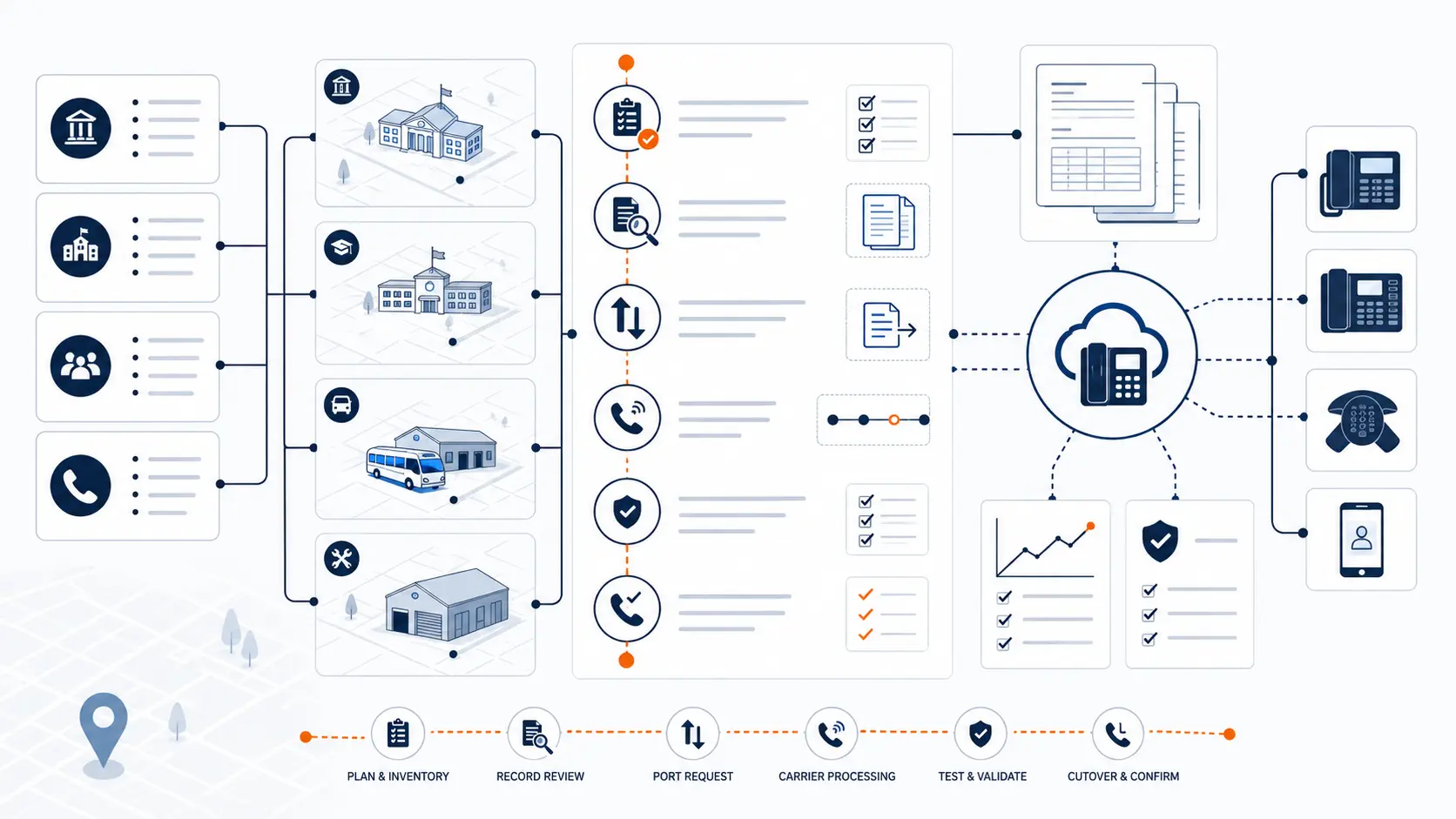
Can a district keep its numbers when replacing a PBX?
Often, yes. Number porting is a normal part of phone system replacement, but districts should inventory main numbers, campus numbers, direct numbers, specialty lines, and carrier records before planning cutover.
Does replacing a PBX affect E911?
Yes. PBX replacement is a key time to review direct 911 dialing, notification, dispatchable location, building mapping, softphones, mobile apps, and testing procedures.
Are analog lines part of PBX risk?
They can be. Analog lines may support fax, alarms, elevators, gates, modems, or other specialty services. These should be inventoried separately because they may not all move the same way.
Is per-extension pricing a legacy risk?
It can be. If a district pays for every extension as a full user, it may pay too much for low-use classroom phones, shared phones, inactive users, and common-area devices.
What should we send before requesting a review?
Send whatever you have: phone bills, vendor proposals, extension lists, campus lists, system notes, outage history, or a summary of what is not working. A perfect inventory is not required.
References
- Multi-line Telephone Systems 911 Requirements
- Kari’s Law and RAY BAUM’S Act
- Cybersecurity for K-12 Education
Ready to review your legacy PBX risk?
Share your current phone setup, phone bill, campus list, or vendor proposal. We will help identify support risk, E911 planning needs, pricing concerns, number porting issues, and practical next steps for replacing or reviewing aging school phone infrastructure.