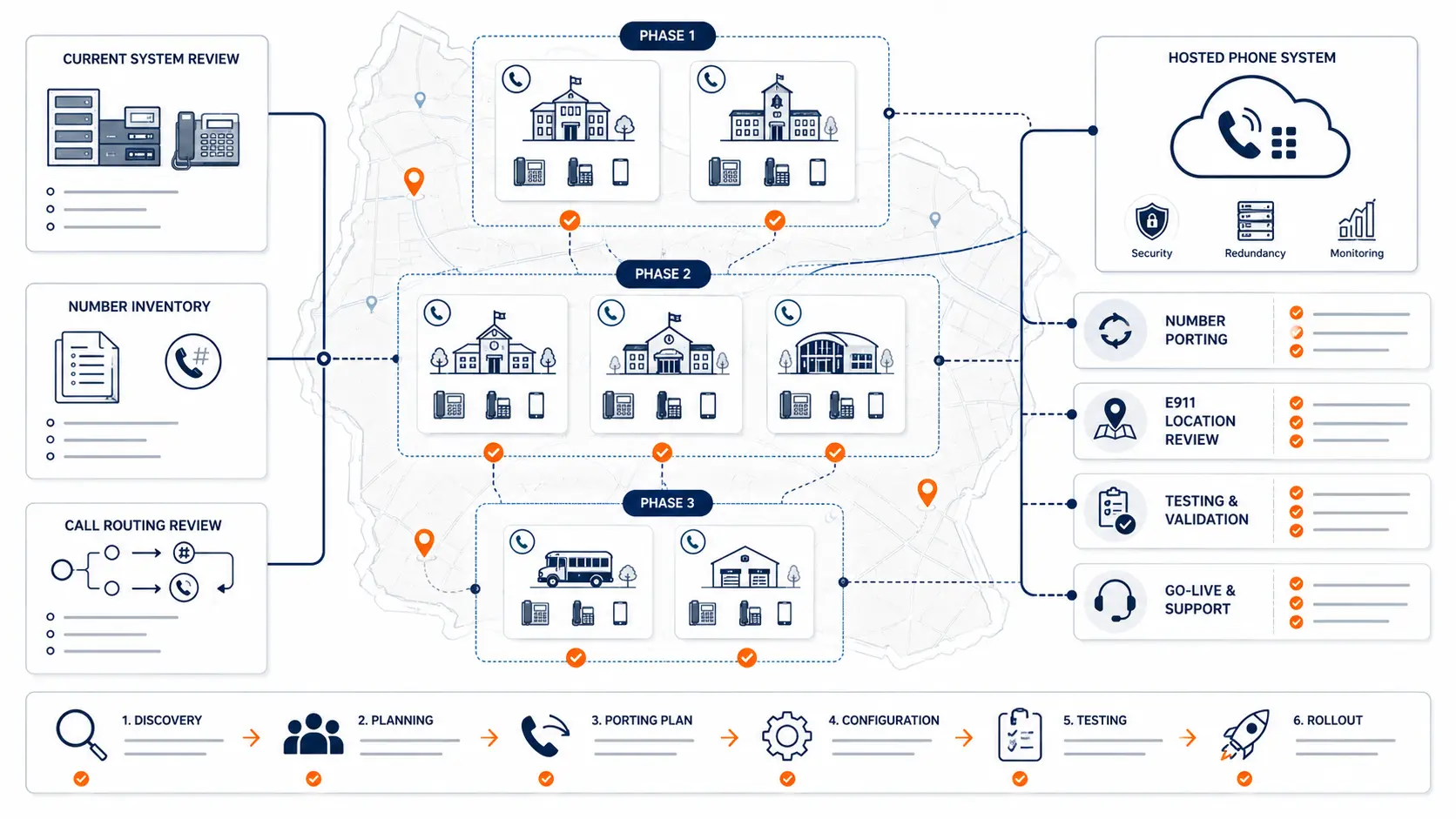
A multi-campus phone system migration is not just a phone replacement project. It affects main numbers, front office call flow, school buildings, emergency calling, number porting, staff roles, after-hours routing, analog lines, support coverage, and the timing of each campus cutover. Districts that treat migration as a single technical switch often discover too late that each building has different calling habits, different legacy equipment, and different risk areas.
The safer approach is to plan the migration as a district infrastructure project. That means documenting what exists, deciding what should change, sequencing cutovers carefully, and testing each site before moving to the next.
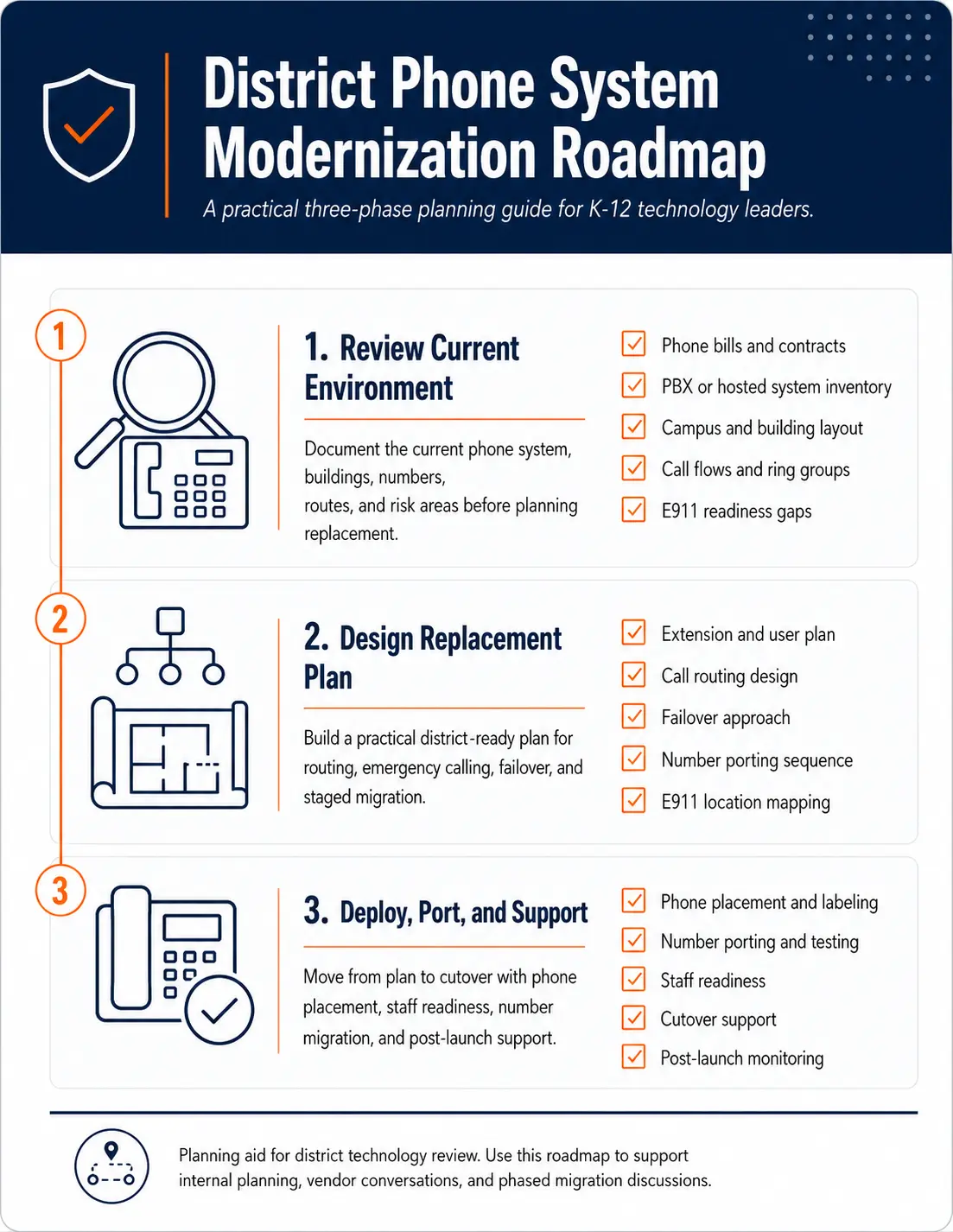
Request System Review | Download the District Phone System Modernization Roadmap
Why multi-campus phone migrations are different
A single office phone migration can often be handled as one cutover. A school district is different. One district may include elementary schools, middle schools, high schools, district administration, transportation, maintenance, athletics, alternative education, and portable classrooms.
Each location may have its own main number, ring groups, office routines, bell schedules, after-hours handling, and emergency calling expectations. A cutover at the district office may not tell you much about how the high school front office or transportation department will behave under the new system.
Multi-campus migrations need more planning around:
- Campus-specific call routing
- Main number ownership
- Direct inward dial numbers
- E911 dispatchable location records
- Staff extensions and shared phones
- Analog lines and specialty services
- Number porting timing
- Network readiness
- Staff communication before launch
- Support coverage during and after cutover
If the district is replacing an older PBX, review the broader planning issues in PBX Replacement for Schools. If the district is moving to a hosted or cloud-based system, review K-12 VoIP Phone Systems and Cloud Phone Systems for Schools.
Start with a campus inventory
A strong migration starts with a clear inventory. Many districts know how many schools they have, but they do not always have a current phone system inventory that matches the way calls actually work.
Create a campus-by-campus inventory that includes:
- Campus name
- Physical address
- Main office number
- Fax numbers
- Department numbers
- Direct inward dial numbers
- Existing extensions
- Phone locations
- Auto attendants
- Ring groups
- Hunt groups
- Voicemail boxes
- Analog lines
- Elevator, alarm, gate, and specialty lines
- Internet and network notes
- Known phone issues
- Existing vendor or carrier notes
The goal is not perfection. The goal is to find gaps before they become cutover problems.
Planning resource: Use the District Phone System Review Checklist to organize current system information before requesting quotes or starting migration planning.
Map call flows before designing the new system
Many school districts have call flows that were built over years of small changes. Someone added an auto attendant. Someone forwarded a main number. A secretary moved offices. A direct line became a shared department number. A bell schedule changed. The phone system kept working, but nobody updated the documentation.
Before migration, map the current call flows and decide what should be kept, simplified, or rebuilt.
| Call flow area | What to review | Why it matters |
|---|---|---|
| Main campus number | Who answers, when it rings, overflow path | Prevents missed parent and visitor calls |
| Attendance line | Routing, voicemail, notification process | Keeps daily office workflow stable |
| District office | Department routing and leadership transfer paths | Supports administration and public access |
| Transportation | Early morning calls, bus route questions, after-hours handling | High call volume at specific times |
| Maintenance | Work orders, urgent calls, after-hours needs | Often separate from front office routines |
| Nurse or health office | Direct lines, transfer paths, voicemail policy | Requires careful routing decisions |
| Athletics or activities | Seasonal changes and after-hours needs | May need temporary routing changes |
Do not assume the old call flow is the right call flow. Migration is a good time to clean up old routing decisions, but changes should be intentional.
Review E911 before cutover
Emergency calling should not be checked after the phones go live. It should be reviewed before design is complete, before phones are placed, and before numbers are ported.
School districts need to review:
- Direct 911 dialing
- On-site notification
- Dispatchable location
- Building and room mapping
- Softphone and mobile app handling
- Shared phones
- Phones that move between rooms
- Portable classrooms
- Administrative and support buildings
- Testing procedures
- Ownership of location data updates
Federal MLTS rules address direct 911 dialing, notification, and dispatchable location requirements for multi-line telephone systems [1]. Districts should review those requirements with legal counsel, public safety authorities, and the appropriate technical team.
Planning resource: Use the K-12 E911 Readiness Checklist before approving a multi-campus cutover plan.
For a deeper planning guide, see E911 Compliance for Schools and What Dispatchable Location Means for School Phone Systems.
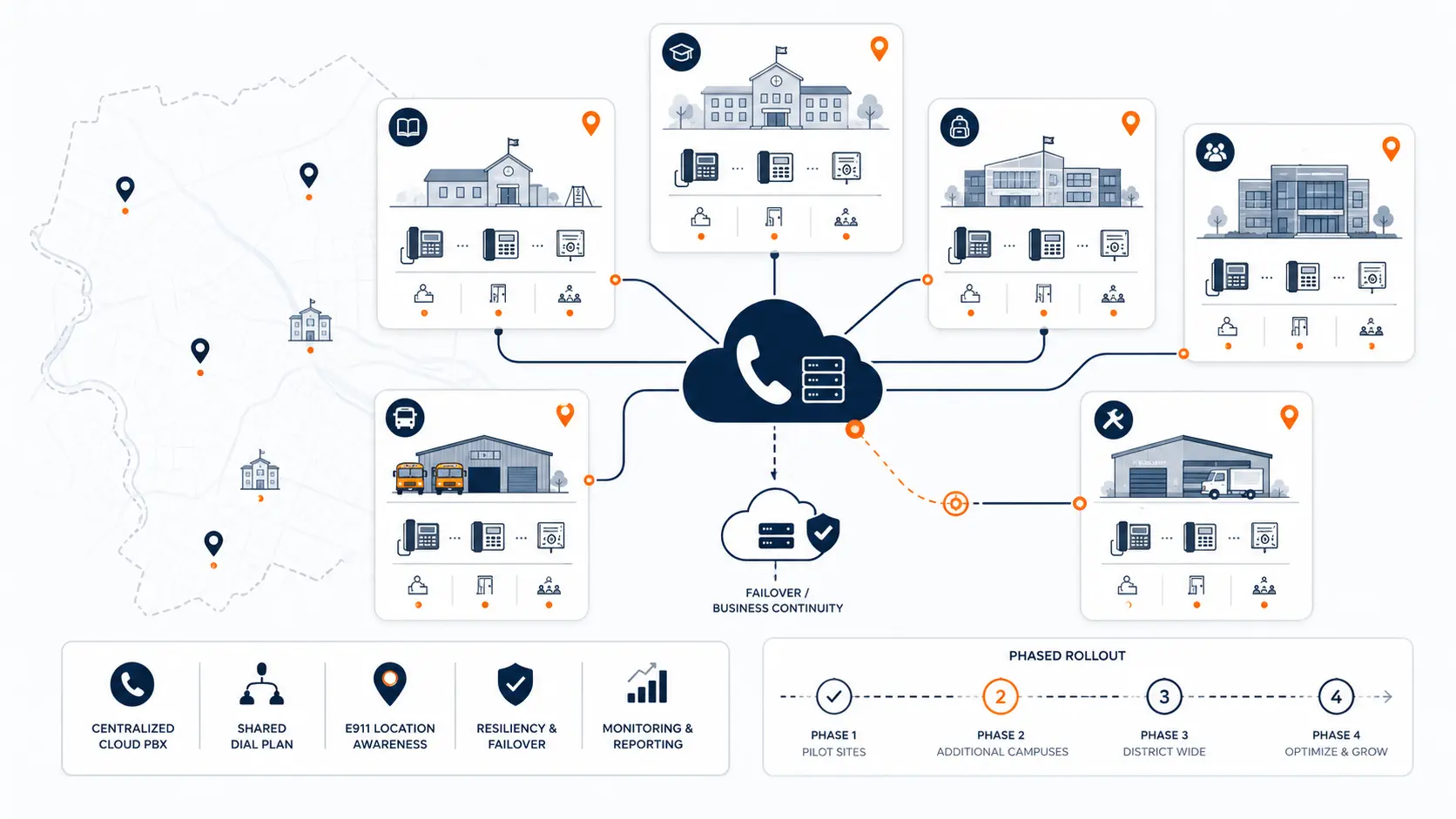
Decide how to phase the migration
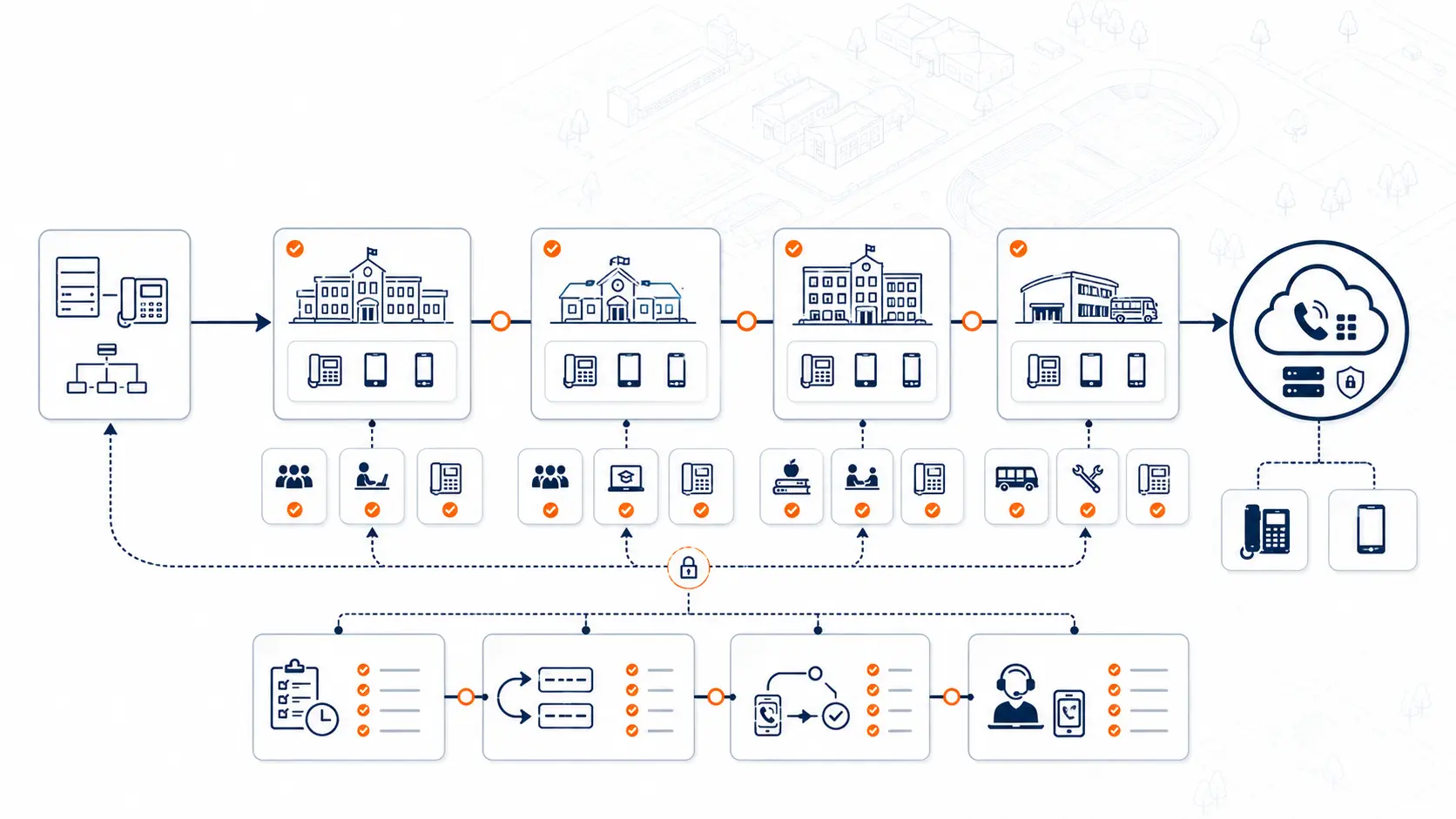
A multi-campus migration does not always need to happen all at once. In many districts, a phased approach is safer.
Common rollout options include:
| Migration approach | Best fit | Watch-outs |
|---|---|---|
| Pilot campus first | Districts with unknown risks or complex legacy systems | Pilot must represent real district conditions |
| Campus-by-campus | Districts with several schools and different building layouts | Requires clean porting and support schedule |
| Department-by-department | District office or operations groups with complex routing | Can create temporary transfer complexity |
| Grade-band rollout | Elementary, middle, high school grouping | Different office workflows still need review |
| Full district cutover | Small districts with simple routing and strong documentation | Higher risk if inventory is incomplete |
The right sequence depends on risk, staffing, vendor availability, carrier timelines, E911 planning, and the school calendar.
For more detail, see How School Districts Can Phase a Phone System Cutover.
Plan number porting carefully
Number porting can create operational problems if it is treated as paperwork instead of a migration sequence. District numbers are public-facing, printed, posted online, used by families, included in emergency records, and tied to internal processes.
Before porting, review:
- Main district number
- Each campus main number
- Attendance lines
- Fax numbers
- Department numbers
- Direct inward dial numbers
- Numbers used by alarms, elevators, or specialty services
- Numbers that should be retired
- Numbers that should forward temporarily
- Numbers that appear on websites, directories, and parent communications
Porting should be aligned with the cutover schedule. A number should not move before the receiving call flow has been built and tested.
For a deeper guide, see What School Districts Should Know About Number Porting Before Changing Phone Systems.
Review network readiness by campus
A hosted phone system depends on the district’s network and internet connections. A successful pilot at one campus does not prove that every building is ready.
Review each campus for:
- Internet reliability
- Switch capacity
- Power over Ethernet availability
- Cabling condition
- Desk phone locations
- Network closet power backup
- Voice traffic handling
- Wi-Fi use for softphones or mobile apps
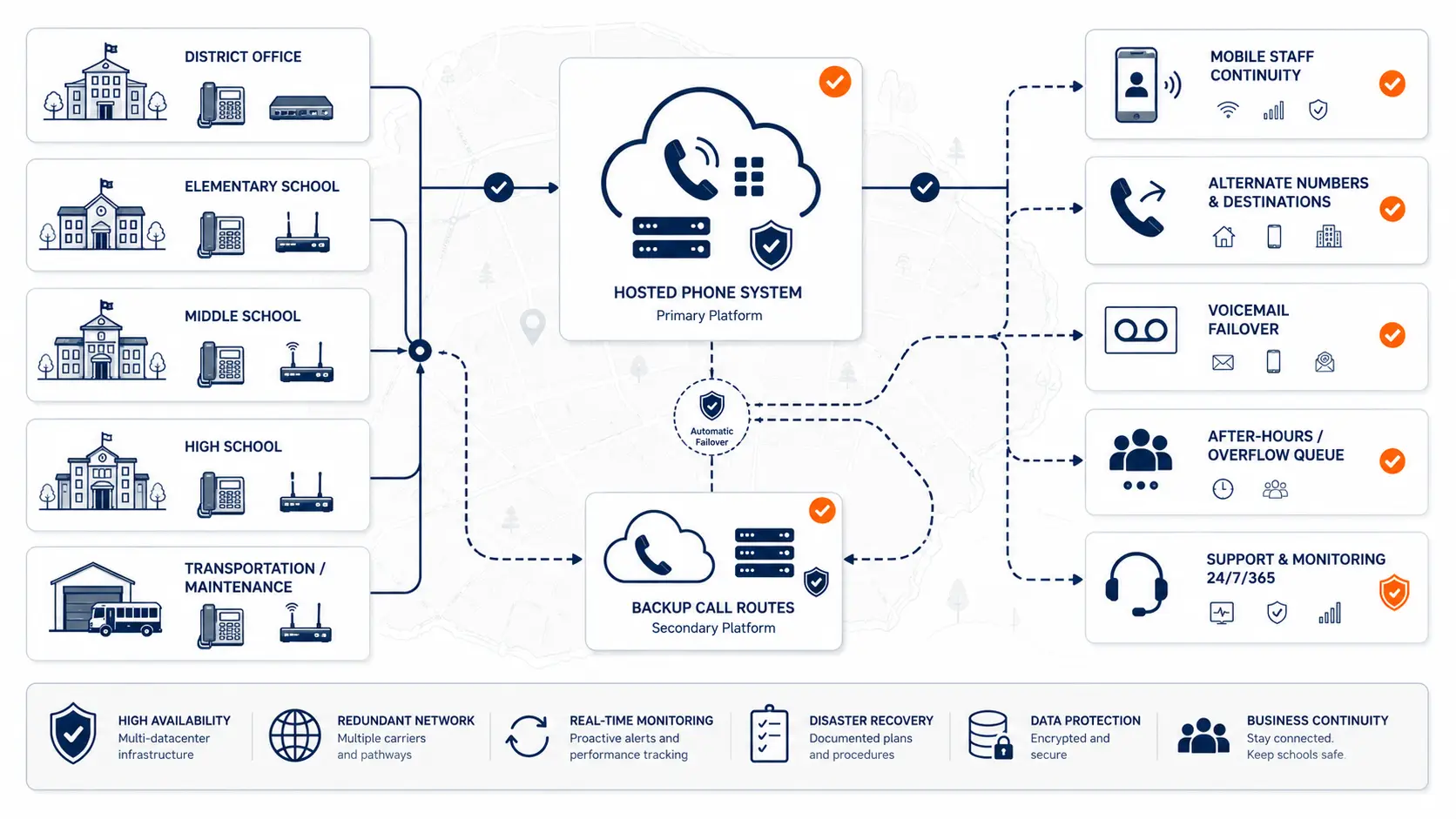
- Failover options
- Support access during cutover
This does not mean every district needs a complicated network project. It means phone migration should not ignore the network. A building with weak cabling, overloaded switches, or unreliable internet may need attention before it becomes part of the rollout.
Identify analog and specialty lines
School districts often have analog services that do not fit neatly into a modern phone system migration. These may include:
- Fax lines
- Elevator phones
- Fire alarm lines
- Security alarm lines
- Gate or door systems
- Athletic facility lines
- Bus garage lines
- Specialty modems or legacy devices
Do not assume every analog line can move into a hosted phone system without review. Some specialty lines may need coordination with alarm vendors, elevator vendors, facilities, carriers, or public safety authorities.
Review Why Analog Line Replacement Matters for School Districts before removing or porting old services.
Check existing hosted VoIP contracts before migrating
Some districts are not replacing an old PBX. They are replacing a hosted VoIP PBX that no longer fits.
That review should include cost, contract, and system design questions:
- Are we paying by extension?
- Are we paying for unused seats?
- Are classroom phones priced the same as active office users?
- Are mobile app licenses bundled into every user?
- Are support fees separate?
- Are E911 or location services billed as add-ons?
- Are device leases or rentals still active?
- Are we locked into an auto-renewal?
- Does the system support district-level routing cleanly?
- Is the admin portal usable for district IT?
Per-extension pricing can be a problem for school districts because many extensions are low-use or location-based. A classroom phone, shared hallway phone, front office user, transportation supervisor, and district administrator do not always create the same calling demand. If the district pays the same monthly amount for every extension, it may be paying too much for the way school phones are actually used.
For more detail, see Why Per-Extension VoIP Pricing Can Cost School Districts Too Much and Hosted VoIP for Schools: What Districts Should Review Before Renewal.
Prepare staff before each cutover
Cutover risk is not only technical. Staff need to know what will change.
Before each campus goes live, provide clear guidance on:
- How to answer and transfer calls
- How voicemail works
- How to reach other campuses
- How to call emergency services
- How to report a phone issue
- What changed from the old system
- What did not change
- Who to contact during the first few days
Front office staff should be part of the review. They know which calls are urgent, which transfer paths matter, and which workarounds exist in the old system.
Build a validation checklist
Each campus should have a validation process before it is considered complete.
Use a checklist like this:
- Main number rings correctly
- Front office routing works
- Attendance line works
- Auto attendant works
- Ring groups work
- Voicemail boxes work
- Internal extensions work
- Inter-campus dialing works
- Outbound caller ID is correct
- E911 test process is completed with proper coordination
- On-site notification recipients are correct
- Fax or specialty lines are accounted for
- Staff know how to report issues
- Support team is available after cutover
Testing should not be casual. Emergency calling tests should be coordinated with the appropriate public safety answering point or authority.
How K12 Phone Systems reviews multi-campus migrations
A system review helps the district move from a vague phone replacement idea to a practical migration path.
K12 Phone Systems reviews:
- Existing phone system
- Hosted VoIP contract or legacy PBX status
- Campus and building list
- Main numbers and extensions
- Call routing
- E911 planning needs
- Number porting requirements
- Analog and specialty lines
- Network readiness questions
- Cutover sequence
- Support needs
- Pricing model concerns
Start with the District Phone System Modernization Roadmap or request a district-specific review.
Frequently asked questions
What is a multi-campus phone system migration?
A multi-campus phone system migration is the process of moving several district buildings, phone numbers, extensions, call flows, and support workflows from an old system to a new phone platform.
Should a district migrate every campus at once?
Not always. A phased migration can reduce risk, especially when campuses have different call flows, legacy equipment, network conditions, or E911 location needs.
What should be documented before migration?
Districts should document campuses, buildings, main numbers, direct numbers, extensions, phone locations, call flows, E911 records, analog lines, carrier services, and cutover constraints.
How does E911 affect a multi-campus migration?
Each campus needs accurate location data, on-site notification, and a testing process. Building and room-level location data should be reviewed before phones are cut over.
Can number porting be phased by campus?
In many cases, yes. Porting should be planned around the cutover sequence, but the final approach depends on carrier rules, number ownership, account records, and the district’s routing plan.
What happens to analog lines during migration?
Analog lines should be inventoried separately. Some may be replaced, some may need specialty coordination, and some may need to remain in place depending on the service attached to them.
Does a hosted phone system remove migration risk?
No. Hosted systems can simplify administration, but districts still need to review routing, E911, porting, staff training, network readiness, and support.
How should districts review existing hosted VoIP contracts before migrating?
They should review extension counts, unused seats, device fees, mobile app charges, support fees, E911 add-ons, auto-renewal terms, and whether the system still matches district workflows.
What is the best first step?
Start with a current-state review. Gather phone bills, campus lists, number records, call flow notes, E911 records, and known pain points before requesting a migration plan.
References
- Multi-line Telephone Systems 911 Requirements
- 911.gov: Next Generation 911
- CISA: K-12 School Security Guide
Ready to plan a multi-campus phone system migration?
Share your current phone setup, campus list, phone bill, system notes, or vendor proposal. We will help identify routing issues, E911 planning needs, number porting considerations, pricing concerns, and a practical migration path.